Find the AI you run, see what's exposed and what it can reach.
AI Security finds the AI services, model servers and agents in the clouds and clusters you've already connected, read-only and with no agent, and checks each one in your normal posture scan.
- AWS
- Azure
- Google Cloud
- Kubernetes
Missing guardrails and AI open to anyone, flagged each scan.
Pick any item to see what Onam checks on it.
View as table
| Resource | Type | What Onam flags | What it reaches |
|---|---|---|---|
| support-assistant | Bedrock agent (AWS) | No guardrail attached; Wide write access | runs as support-agent-role; reads customer-tickets (S3 bucket) |
| churn-notebook | SageMaker notebook (AWS) | Admin access | runs as ml-exec-role |
| chat-prod | Azure OpenAI deployment (Azure) | Content filter attached | — |
| pricing-model | Vertex AI endpoint (Google Cloud) | No Model Armor | — |
| llm-gpu | Ollama model server (Kubernetes · ns ml) | Open, no login | Reach is not drawn for self-hosted AI today. |
| vectors | Qdrant vector database (Kubernetes) | Nothing (in the inventory) | Reach is not drawn for self-hosted AI today. |
| research | Jupyter notebook (Kubernetes) | Nothing (in the inventory) | Reach is not drawn for self-hosted AI today. |
| support-api | Repository (From its SBOM) | Nothing (in the inventory) | AI ingredients: AI library, Model SDK, MCP SDK |
What happens to the model server someone forgot?
Onam finds it in the next posture scan, recognises it as AI, and flags it if anyone can reach it without a login.
- 1 of 4 · Friday, 5:40 pm
Someone starts a model server on a spare GPU node to test something. It's still running.
- 2 of 4 · Loophole moves in
Loophole's doing: anyone who finds the server can talk to it. There is no login in front.
- 3 of 4 · The next scan
Onam recognises it as Ollama, checks its exposure, and raises Exposed without authentication in your usual queue.
- 4 of 4 · Monday
Close it the usual way. And the AI nobody listed is now in your inventory.
Where do I see this in Onam?
AI Security has its own area in the console. Inventory lists every AI resource the last scan found, in four views.
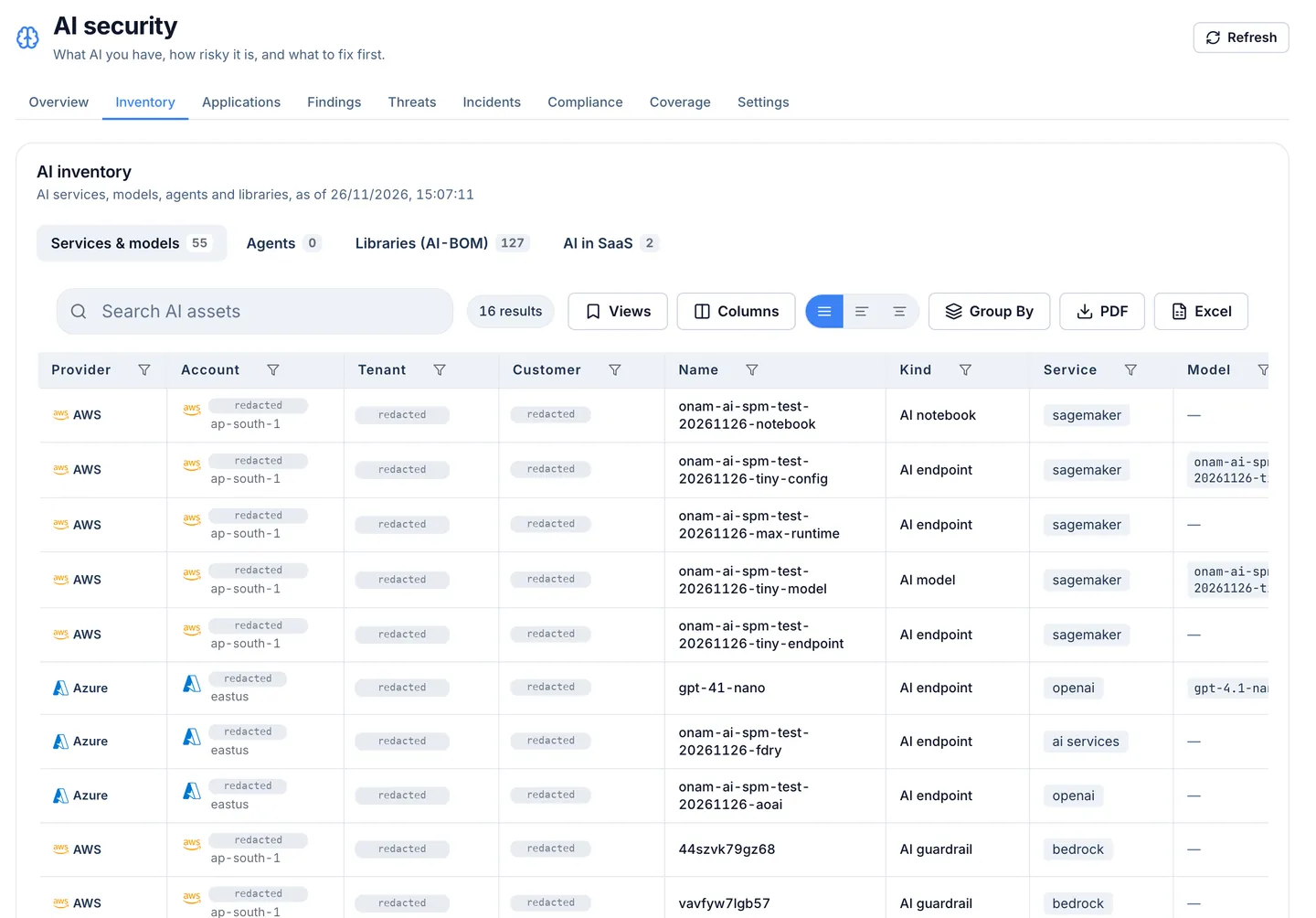
The tabs, in the order the console shows them:
| Tab | What it answers |
|---|---|
| Overview | Not available yet (planned). Today, Inventory and Findings show your AI and its findings |
| Inventory | What AI do we run, and where? Services and models, agents, libraries (AI-BOM) and AI in SaaS |
| Applications | Which AI belongs together? Assets grouped by the onam-ai-app tag, links between AI assets, and code |
| Findings | What should we fix first? Grouped by category, with views for fix first, new this week and internet exposed |
| Threats | Is anything suspicious happening on our AI? Detections on AI assets, from Onam threat detection |
| Compliance | Where do we stand on AI frameworks? By framework or by resource |
| Coverage | What can Onam see, and what can't it? Per AI product, with what to do about the gaps |
| Settings | Prompt-text detection (off by default), AI detectors, the tool limit per AI agent and the application tag |
Every AI finding is a normal Onam finding, so it also flows into compliance reports and exports.
What does it check, and what doesn't it?
It checks how your AI is set up and what it can reach. It does not test your models or change anything.
What it checks
- Finds managed AI services on AWS, Azure and Google Cloud
- Finds self-hosted AI on your Kubernetes clusters, and flags it when it is exposed without authentication
- Lists the AI components in your software from your SBOMs: the AI bill of materials
- Finds AI apps in your connected SaaS, such as Microsoft Copilot or Claude in Google Workspace
- Checks that a provider guardrail is attached on all three clouds: Bedrock Guardrails, Azure content filters or Google Model Armor
- Shows which data stores an AI service reads, and flags AI agents with admin or wide write access
- Maps AI findings to OWASP Top 10 for LLM 2025, NIST AI RMF, ISO/IEC 42001 and the EU AI Act
What it does not do (today)
- Send prompts to your models, red-team them, or measure what a guardrail blocks
- Read prompt or answer text, unless an admin turns on prompt-text detection in Settings
- Run configuration rules on self-hosted AI (they are written, not yet switched on)
- Draw AI findings on attack paths (not switched on yet)
- Cover AI services on Oracle Cloud, Alibaba Cloud or IBM Cloud, or connect to the OpenAI platform
- Make you compliant: a framework mapping is evidence, not full coverage
Where do you want to go next?
- How does Onam find AI we didn't list?Cloud roles, a read-only ServiceAccount, and the SBOMs you already have.
- Which of our AI has no guardrail, and is any of it open?Guardrail presence on three clouds; self-hosted servers with no login.
- What data can our AI read, and what can our agents do?One hop each: the identity it runs as and the stores it reads.
- What does "mapped to the EU AI Act" actually mean?Partly automated, you attest, and why a mapping is not coverage.
- Does it cover our clouds?Pick a cloud and see exactly what is checked.
- Request a demoSee AI Security on your own clouds, with someone who builds it.
Questions customers ask
We already use Bedrock Guardrails. What does Onam add?
Bedrock Guardrails filters content on the models you attach it to. Onam checks whether a guardrail is attached, across models, deployments and agents, and does the same for Azure content filters and Google Model Armor, so one view answers "which of our AI has no guardrail?" on all three clouds. It also covers what guardrails do not: AI servers exposed without authentication, the identity each AI service runs as, which data stores it reads, and the mapping to AI frameworks. Onam does not replace the guardrail or test its policy.
Does Onam read our prompts or model data?
Not by default. AI Security works from configuration and metadata: what the cloud APIs report about each AI resource, what the Kubernetes API reports about each workload, and the package lists in your SBOMs. Reading prompt and answer text, to find prompt injection, jailbreaks and sensitive answers, is a setting called prompt-text detection. It is off unless an admin turns it on. Onam never reads training data or model weights.
Do I need to deploy anything for AI Security?
No extra component. It runs in the posture scan of the cloud accounts and Kubernetes clusters you have already connected. If a cluster is not connected yet, follow Connect Kubernetes clusters.
Which clouds are covered?
AWS, Azure and Google Cloud for managed AI services, plus self-hosted AI on any connected Kubernetes cluster. Oracle Cloud, Alibaba Cloud and IBM Cloud AI services are not covered. See Coverage by cloud.
We already have a CNAPP with AI-SPM. Why look at Onam?
Ask it four questions: does it check that a guardrail is attached on AWS, Azure and Google Cloud; does it find a model server someone runs on your own Kubernetes cluster; does it list the AI libraries and MCP SDKs in your code; and does it show which data each AI service reads and which AI agents hold admin rights? Onam does all four, read-only, in the posture scan you already run. Where it stops is written on every page.
Our clusters are private. Can Onam still see self-hosted AI?
Only if Onam can reach the cluster's API server, for example a public endpoint restricted to Onam's egress IPs. Onam deploys no agent or scanner in the cluster. See Connect Kubernetes clusters.
Will Onam find staff using AI tools on their laptops?
No. Onam sees AI in the cloud accounts, clusters, code and SaaS platforms you connect. AI apps used through a connected SaaS platform appear under AI in SaaS; a tool running only on a laptop does not.
Where is our data hosted?
In the region you choose, such as the US, Europe or India, to meet your compliance requirements.
Does this make us compliant with the EU AI Act?
No tool does that on its own. AI findings map to EU AI Act controls, which gives you evidence for the controls a configuration check can speak to. Most of the Act is about how you build, document and govern AI, which you evidence yourself. See AI compliance mappings.