DSPM overview
DSPM in Onam Security: find every cloud data store, label it from metadata, and see how it is exposed, who reaches it and where its data flows.
Data security posture management answers three questions continuously rather than once before an audit: what data do we hold, where is it, and how exposed is it? Onam's DSPM runs inside every scan, alongside posture, identity and attack-path analysis, and writes its results onto the same security graph.
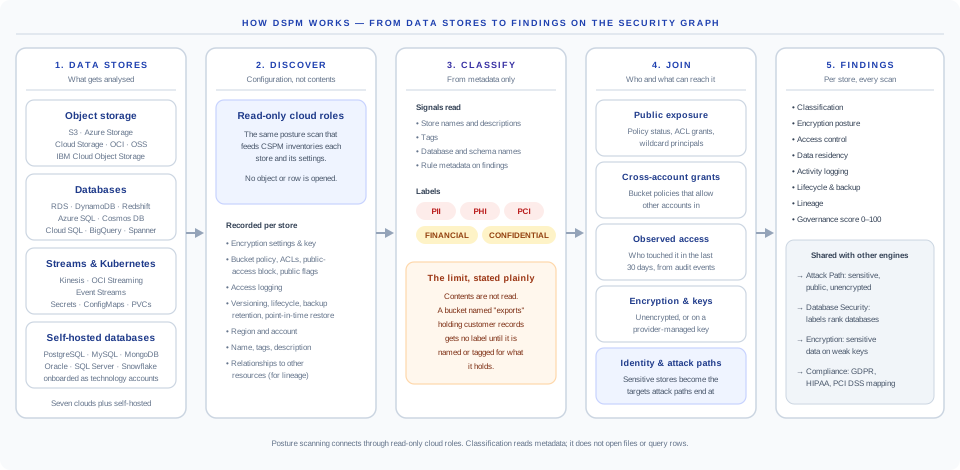
The five stages
| Stage | What happens | Read more |
|---|---|---|
| 1. Data stores | Object storage, managed databases and warehouses, streams, Kubernetes secrets and ConfigMaps, and self-hosted databases you onboard | Coverage by cloud |
| 2. Discover | The posture scan records each store and its settings: encryption, policies, ACLs, public-access block, logging, versioning, backup, region, relationships | Discovery |
| 3. Classify | Names, descriptions, tags, database and schema names become PII, PHI, PCI, financial and confidential labels. Contents are not read | Classification |
| 4. Join | Public grants, cross-account grants, observed access, encryption and keys, attack paths | Access mapping |
| 5. Findings | Per store, every scan: classification, encryption, access, residency, logging, lifecycle, lineage and a 0–100 governance score | Findings reference |
What DSPM is, and is not
- It is an always-current catalog of your data stores, with a sensitivity label you can trace to its source, and the exposure that makes each label matter.
- It is metadata-based. It does not open objects, query rows, read stream messages or read secret values. Posture scanning connects through read-only cloud roles.
- It is not a content scanner. A store whose name and tags say nothing about what it holds gets no label until someone tags it. See Classification and its limits.
- It is not a DLP tool. It does not watch data in motion or block transfers.
How it connects to the rest of Onam
DSPM, Database Security and Encryption & Keys share one scan and answer different questions about the same data.
| Engine | Question | What it takes from DSPM | What it gives back |
|---|---|---|---|
| DSPM | What data do we hold, where, how exposed? | — | Labels, exposure, lineage, governance score |
| Database Security | Is each database hardened, private, audited, backed up? | Labels on each database | A sensitive database that is public or unencrypted is raised to critical |
| Encryption & Keys | Is it encrypted with a key we control? | Labels on each store | Sensitive data unencrypted (critical) or on a provider-managed key (high) |
| Attack Path | Which chains of findings reach something valuable? | Sensitive, public and unencrypted flags per store | Paths that end at a sensitive store are scored as reaching a crown jewel |
| CIEM | Who can do what? | — | Data-related identity findings merged into the DSPM view |
Where to find it in the console
- Data Security — the catalog, findings, residency and access-monitoring tabs.
- Data Security → Lineage (
/ui/datasec/lineage) — reconstructed chains with cross-region and cross-account hops flagged. - Database Security and Encryption — their own pages, with DSPM labels already applied.