AI Code Fix
AI Code Fix turns static-analysis findings into corrected source files on a separate branch, for your team to review and merge.
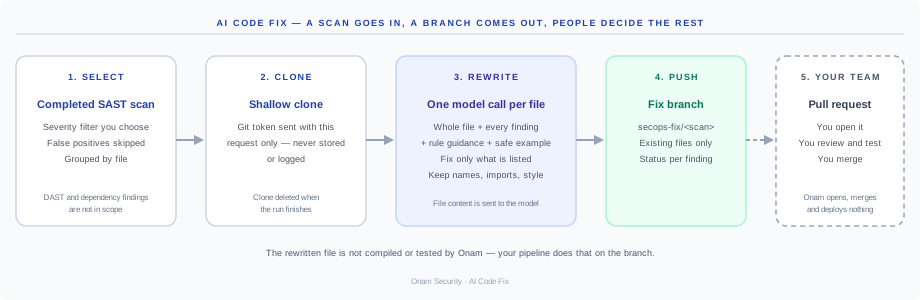
How you use it today
AI Code Fix is run with you on request — it is not yet a button in the console. You choose a completed scan and the severities to include, and supply a Git token for that run. In the console, every code finding already has an AI fix prompt you can copy into the assistant your team uses.
What it does, step by step
- Select. Findings from the chosen static-analysis scan are filtered by severity. Findings marked as false positive or not applicable are skipped. The rest are grouped by file.
- Clone. The repository is shallow-cloned using the Git token sent with this request. The token travels in a request header, is never written to the database or logs, and the clone is deleted when the run ends.
- Rewrite. For each file, a large language model receives the whole file, every finding in it, and the rule's guidance — what the issue is, how to fix it, and a safe example where the rule has one. It is told to fix only the listed issues and keep everything else — names, imports, indentation and style — unchanged, and to return the complete file. One call per file means several findings in one file are fixed together.
- Write. A corrected file is written back only if it differs from the original and the path already exists inside the repository.
- Push. Changed files are committed to a new branch named
secops-fix/<first 8 characters of the scan ID>and pushed. The commit message asks for review before merging.
What it never does
- Open, approve or merge a pull request.
- Write to your default branch.
- Deploy anything.
- Write tests, IaC patches or dependency upgrades.
- Fix DAST or dependency findings — they have no source line to rewrite.
What it does not check
Onam does not compile, lint or test the rewritten file. Your normal pipeline should run on the fix branch before anyone merges it.
Status per finding
Each finding in the run ends as one of: applied (committed to the branch), fix generated (a fix was produced but not committed), failed, or skipped, with the reason.
Data handling
- The full content of each affected file is sent to the language model. Only files with findings are sent.
- The Git token needs read access and permission to push a branch. It is not stored.
- Each run is audit-logged: who asked, for which scan and which repository.
- Runs are limited in concurrency and time; a busy or over-long run is rejected rather than queued indefinitely.
See also the AI Code Fix product page.