CIEM overview
Onam CIEM resolves what each cloud identity can do, finds its escalation paths, and turns the riskiest into tracked access reviews.
What CIEM answers
| Question | Where you find the answer |
|---|---|
| What can this identity actually do? | The Effective Access panel on the IAM Security screen — search any principal |
| Can it make itself an admin? | Escalation findings and the Shadow Admins count on the CIEM screen |
| Who outside my account can get in? | Cross-Account findings — external, wildcard and federated trust |
| What has it been granted but never used? | Least Privilege column and the identity detail dialog (AWS) |
| Which identities should a person look at first? | Risk Score column and the Access Reviews view (AWS) |
How it fits together
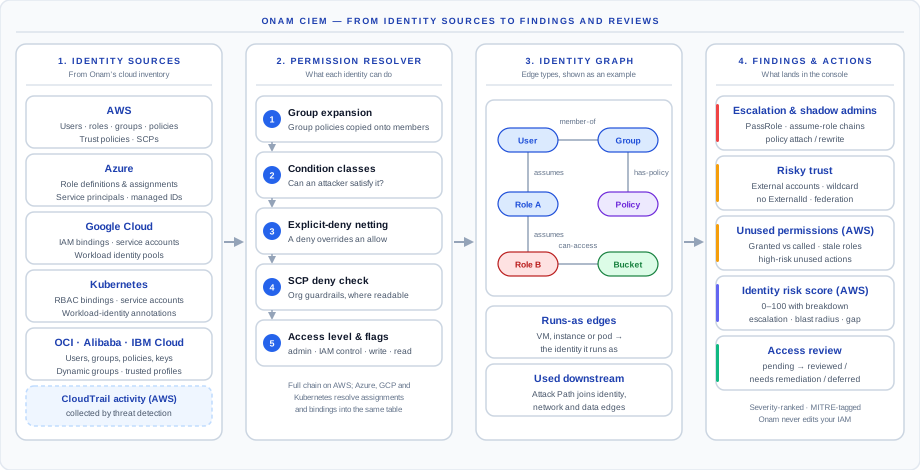
- Identity sources. CIEM reads identities, policies and trust settings from the cloud inventory that Onam's posture scan already builds. It makes no extra calls into your cloud. On AWS it also reads CloudTrail activity collected by Onam's threat detection.
- Effective-permission resolver. Per identity: group expansion, condition classification, explicit-deny netting and SCP deny checks, producing one effective-access row per identity, resource scope and access level. See How effective permissions are computed.
- Identity graph. Identity relationships are written to the platform's security graph, where escalation, blast radius and Attack Path analysis read them. See Reading the identity graph.
- Findings and reviews. Escalation paths, shadow admins, risky trust, unused permissions and stale roles become findings; AWS identities get a 0–100 risk score, and high-tier identities open an access review. See Finding types and Right-sizing workflow.
CIEM and IAM Security
Both are views of one identity engine and share one inventory.
| IAM Security | CIEM | |
|---|---|---|
| Question | Is this identity configured safely? | What can it do, how could it escalate, what does it never use? |
| Typical finding | User without MFA, access key past rotation, wildcard policy | PassRole to an admin role, external trust without ExternalId, high permission gap |
| Unit of analysis | One setting on one identity | The identity after policies, groups, denies and trust are resolved |
| Console | IAM Security screen (with the Effective Access panel) | CIEM screen: Identities, Findings, Access Reviews |
Start with IAM Security to clear hygiene; use CIEM to shrink access and close escalation paths.
The CIEM screen
The console's CIEM screen has three views:
- Identities. Headline counts for identities at risk, escalation paths (with how many are CDR-confirmed), shadow admins and zombie identities; a breakdown by identity type — roles, users, service accounts, root; and a table with risk score, least-privilege gap, blast radius, admin access and zombie status per identity. Clicking a row shows the score breakdown and the high-risk unused actions.
- Findings. One table for escalation, policy, cross-account and database identity findings, with bulk suppress, export and ticket creation.
- Access Reviews. The attestation queue — see Right-sizing workflow.
Coverage at a glance
AWS has the deepest coverage: full effective-permission resolution, multi-hop assume-role chains, shadow admins, unused permissions, risk scoring and access reviews. Azure, GCP and Kubernetes have effective access and escalation detection; OCI and IBM Cloud have escalation detection; trust checks run on every cloud except Kubernetes. Details are in Per-cloud notes.
What CIEM does not do
- It never changes your IAM. Findings and reviews tell you what to remove; you remove it.
- Unused-permission analysis is AWS-only today, and needs CloudTrail activity to be flowing into Onam's threat detection.
- There is no separate identity-graph screen. You read the graph through the Effective Access panel, escalation findings and the Attack Path view.