Compliance
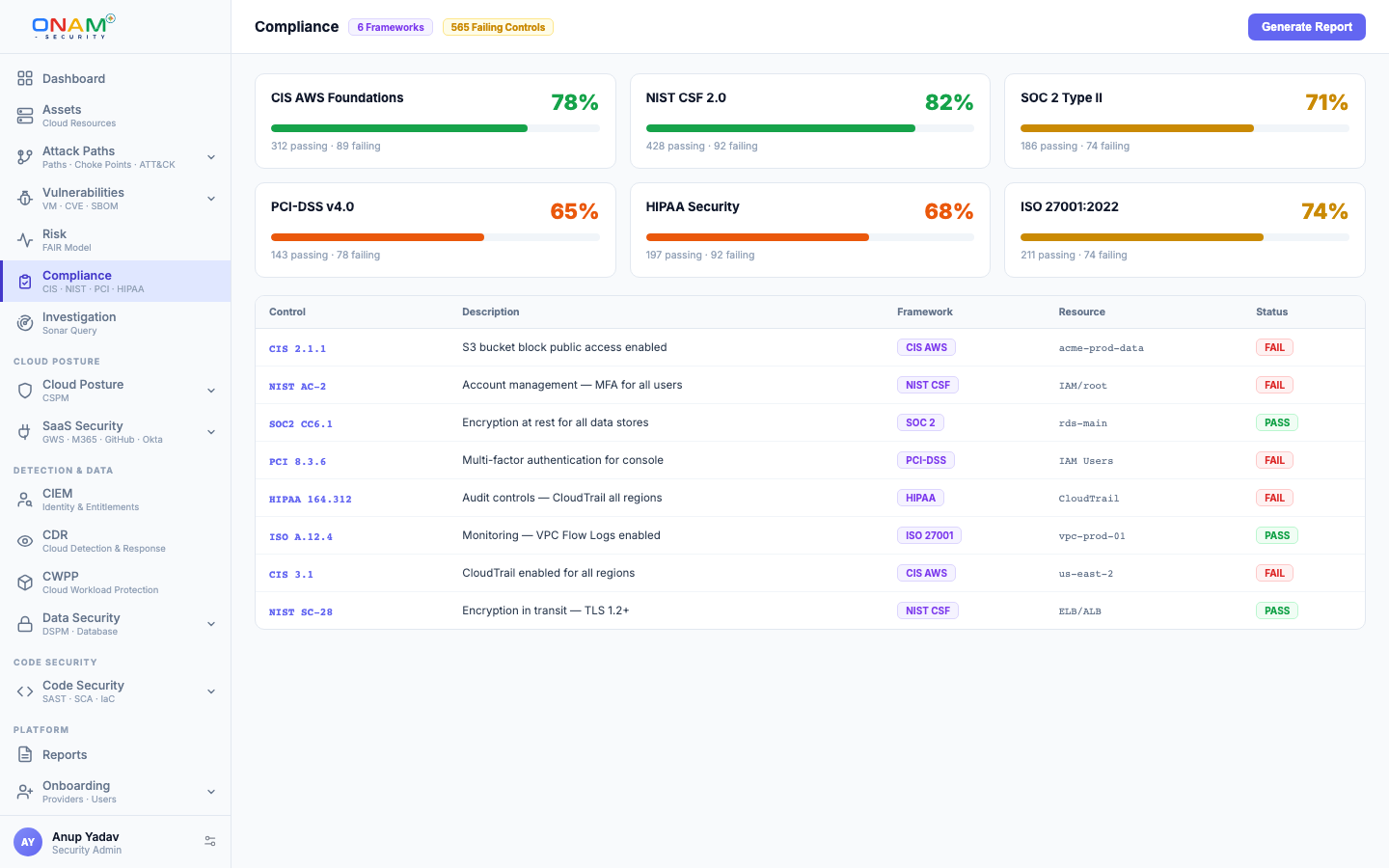
Onam's Compliance engine turns security findings into compliance posture: findings are mapped to the controls they affect across 78 frameworks, each control is assessed, and each framework gets a 0–100% score you can track, drill into and export.
This page explains where the findings come from, how controls are assessed and scored, and how to export reports. For the framework list, see Framework Coverage.
From Findings to Scores
Compliance runs after a scan. No separate "compliance scan" is needed — the same scan that finds a public bucket also updates your PCI DSS score.
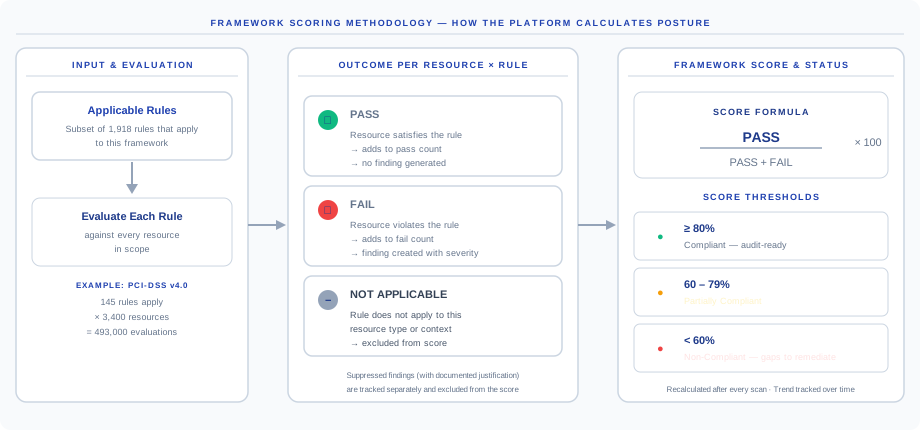
- Load. The engine reads the latest findings from four sources: posture checks, threat detection, vulnerabilities, and technology checks.
- Map. Each rule is resolved against the rule-to-control mapping catalog. One rule can cite controls in several frameworks, so a single check produces evidence for many frameworks at once.
- Assess. Each control is assessed from the resources evaluated against it.
- Score. Control results roll up into a 0–100% score per framework, and each result is kept for the trend.
- Report. Reports are assembled with evidence per control; exporters produce PDF, CSV, Excel and JSON.
Control Mapping
Because the mapping is many-to-many, one failed check counts against every framework that cites it. Every control page lists the resources that passed and failed, and every resource can be looked up to see the controls it affects across frameworks.
Control Status and Scores
Each control is assessed as one of five statuses:
| Control status | Meaning |
|---|---|
| Pass | Every evaluated resource passed the checks mapped to the control |
| Fail | Every evaluated resource failed — the failing resources are listed on the control |
| Partial | Some evaluated resources passed and some failed |
| Manual review | The control cannot be assessed automatically and needs a person to review it |
| Not applicable | No resources were evaluated against the control in the scanned scope |
The framework score (0–100%) rolls up the control results. Scores are recomputed from the latest findings and kept over time, so the trends view shows whether posture is improving.
Automated scanning evaluates technical controls — encryption, logging, access policies, network exposure. Frameworks also contain administrative and process controls (security training, vendor management) that no scanner can assess. Those controls are marked for manual review rather than scored as passing, so the score shows exactly what was checked.
Framework Catalog
The catalog covers 78 frameworks: CIS benchmarks for AWS, Azure, GCP, OCI, Alibaba Cloud, IBM Cloud and Kubernetes (including managed Kubernetes services), CIS benchmarks for operating systems, databases, web servers, network devices and SaaS platforms, NIST 800-53, NIST 800-171, ISO 27001:2022, PCI DSS, HIPAA, GDPR, SOC 2, FedRAMP Moderate and High, RBI frameworks for banks and NBFCs, and Canada PBMM.
The full list is on Framework Coverage. Custom rules built in the Rule Builder can carry their own framework mappings.
Evidence
Evidence is collected per control from the scan that produced the result — the resources evaluated, their results, and when the evidence was collected. You do not take screenshots or assemble evidence by hand.
Exceptions
An exception or compensating control is recorded against a control with a justification, an approver and a target date. Exceptions stay visible in compliance views and are flagged as their expiry nears, so an accepted risk never disappears silently. Rule-level suppressions in CSPM are separate and carry their own reason and expiry.
Reports and Exports
| Report | What it contains | Audience |
|---|---|---|
| Executive summary | Score per framework and the overall picture | Leadership, board reporting |
| Framework report | Control-by-control breakdown for one framework, with failing resources | Compliance team, auditors |
| Resource drilldown | Framework → control → resource, and every control citation for a resource | Engineers fixing findings |
| Account view | Compliance for one cloud account | Account owners |
Reports export as PDF and CSV, and also as Excel and JSON.
Running Compliance Reports
- Open Compliance in the Onam console and select a framework.
- Review the per-control breakdown — each failed control lists its failing resources.
- Fix findings (or record an exception with a justification) and re-scan; the score updates on the next run.
- Export the framework report as PDF or Excel for evidence.
API
# List supported frameworks
GET /api/v1/compliance/frameworks

# Full report for one framework
GET /api/v1/compliance/framework/{framework_id}/report

# Executive dashboard across frameworks
GET /api/v1/compliance/dashboard

# Historical score trends
GET /api/v1/compliance/trends
Report exports accept a format parameter (json, pdf or csv), and each framework has PDF and Excel downloads. Full schemas are in the API reference.
FAQ
How often do scores update? Each time compliance runs after a scan, including scans you start on demand. Every result is kept for trend reporting.
Can I score a single account? Yes. Compliance can be viewed per cloud account as well as across all accounts.
Do custom rules affect compliance scores? Yes, when you assign framework mappings to them in the Rule Builder. Unmapped custom rules produce findings but do not change framework scores.
What does a score of 100% mean? Every automatically assessed control passed in the latest results. Controls marked for manual review still need a person to review them.
Next steps
- Framework Coverage — the 78 frameworks
- CSPM — the posture rules that generate most of the underlying findings
- Data Security — data findings and sensitive stores
- Book a demo — see your framework scores on a live connected account