Code Security — overview
Onam Code Security scans the things that build your applications: source code, dependencies, infrastructure-as-code templates and — if you give it a URL — the running application itself. It lives in the same console as Onam's cloud posture, identity and data engines, under the same login and roles.
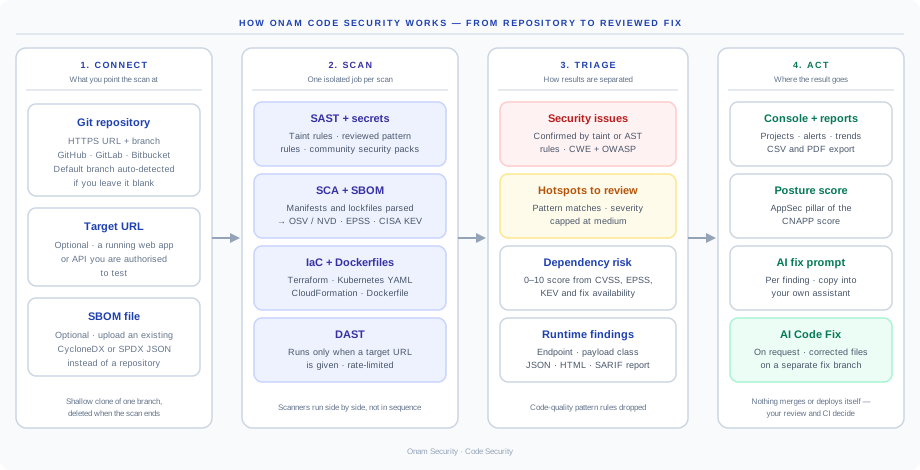
What a scan does
| Scanner | What it reads | What it produces |
|---|---|---|
| Static analysis (SAST) | Source files in Python, JavaScript, TypeScript, Java, C#, Go, C, C++ and Ruby | Security issues (proven by taint or AST rules) and hotspots to review (pattern matches) |
| Secret detection | Every file in the clone | Hard-coded credentials, keys and tokens |
| IaC checks | Terraform, YAML (Kubernetes, CloudFormation), JSON and Dockerfiles | Misconfigurations in templates and images |
| Dependencies and SBOM (SCA) | Manifests and lockfiles, or an uploaded SBOM | Vulnerable packages with a 0–10 risk score, and a CycloneDX 1.5 SBOM |
| Dynamic testing (DAST) | A running web app or API, from its URL | Findings per endpoint, exportable as JSON, HTML or SARIF |
Static analysis, secret detection, IaC checks and dependency analysis run on every repository scan. Dynamic testing runs only when the scan includes a target URL.
How it fits with the rest of Onam
- Same platform, same roles. Code findings are read and scans started with the same role-based access as every other engine.
- Posture score. SAST and DAST results feed the AppSec pillar of the CNAPP posture score.
- Shared advisories. Dependency findings are matched against the same OSV and NVD advisory store the Vulnerability engine uses.
- Findings store. Static-analysis findings are also written to the platform-wide findings store, tagged as code, with the file path as the resource.
What it does not do yet: link a code finding to the container image or cloud workload built from that repository, tell you whether a vulnerable dependency function is actually called, or trace a runtime misconfiguration back to its template line. Plan around those gaps rather than assume them away.
Fixing what it finds
Every finding carries the rule's guidance and an AI fix prompt you can copy into your own assistant. For static-analysis findings, AI Code Fix can rewrite the affected files and push them to a separate branch for your review.