Data Security (DSPM)
Data Security Posture Management (DSPM) answers two questions security teams cannot answer manually at cloud scale: where is your sensitive data, and is it properly secured? Onam's Data Security engine discovers every data store across cloud storage, databases, and data pipelines — managed AND shadow stores — classifies the data inside them as PII, PCI, or PHI, and grades each store for encryption, access control, retention, and logging.
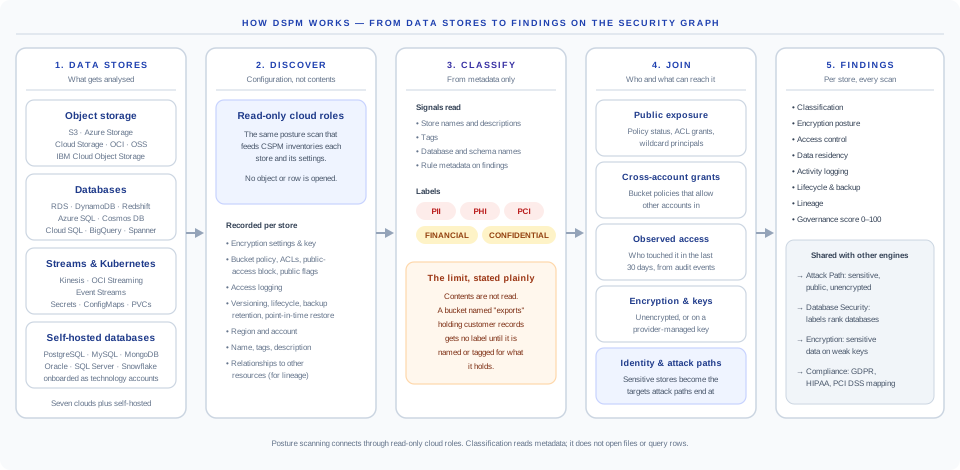
This page explains the four-stage DSPM pipeline, the classification taxonomy, how exposure levels determine severity, and how data-flow analysis catches sensitive data leaking into less-secure downstream stores.

What DSPM Solves
Every cloud organization hits the same five data-security failure modes. They share a single root cause: new data stores are created faster than they are reviewed, classified, and secured.
| Failure mode | What it looks like | Why it happens |
|---|---|---|
| Shadow data stores | An S3 bucket created for a one-off task that quietly accumulates production data | Bucket creation is one API call; governance is a multi-step process |
| Over-exposed data | A public bucket with PII inside, discovered by a third-party researcher | A misclick in bucket settings or IAM copied from a public-asset bucket |
| Unencrypted sensitive data | An RDS instance holding PII without encryption at rest | Default encryption was opt-in for years; legacy databases predate the default-on era |
| Stale sensitive data | An old backup bucket with customer data from a deprecated product, never purged | Lifecycle policies get forgotten when the owner leaves the team |
| Misconfigured access | Developers with direct read access to the production customer database | Incident-response convenience that nobody removed afterward |
DSPM closes the gap by re-evaluating every data store on every scan — managed stores, shadow stores, backups, snapshots, and the pipelines that move data between them.
How DSPM Works
DSPM runs as a four-stage pipeline against every data store in your connected accounts: Discover what exists, Classify what's inside, Evaluate the security controls, Emit prioritized findings. The pipeline is agentless — no database extensions, no inline scanners, no network taps.
1. Discover — find every data store
The engine enumerates every data store reachable from your read-only credential, including ones nobody is tracking:
- Object storage — every S3 bucket, Azure Blob container, GCS bucket, OCI Object Storage bucket, Alibaba OSS bucket, and IBM COS bucket, including buckets untouched for a year.
- Managed databases — RDS (every engine), Azure SQL, Azure DB for Postgres/MySQL, Cosmos DB, Cloud SQL, BigQuery, DynamoDB, Redshift, Synapse, and more.
- Shadow stores — self-managed databases on compute instances, attached volumes containing data files, orphaned RDS snapshots. Detected through instance-metadata pattern matching, security-group inspection, and data-file fingerprinting.
A typical AWS account has 2–3x more shadow stores than the security team is tracking. Surfacing them is half the value of DSPM.
2. Classify — identify what's sensitive
For every discovered store, the engine samples a small, statistically valid window of content using your read credential, returns only matched-pattern metadata, and discards the sampled data immediately. Bulk data never leaves your cloud account.
Classification combines regex patterns, format validators (Luhn for cards, mod-11 for national IDs), and ML models for ambiguous cases. Each classification carries a confidence score; below a configurable threshold the data is flagged "possibly sensitive" rather than positively classified.
3. Evaluate — check the security controls
For every store containing sensitive data, four control axes are evaluated, plus residency for regulated data:
- Encryption at rest — is a KMS-managed key in use, is rotation enabled, is the key shared more broadly than it should be?
- Access controls — is the store public, reachable from external accounts, or broader than the workload needs? (The CIEM signal feeds in here.)
- Retention — is a lifecycle policy in place, and is data older than the policy window flagged?
- Logging — are access logs enabled and tamper-proof? Can you reconstruct who read what for the last 90 days?
- Residency — PCI cardholder data or GDPR-scoped data outside the approved geographic region is flagged immediately.
4. Findings — prioritized, framework-mapped output
Each finding includes the affected store, the data classification, the failed control, the suggested fix, framework citations (GDPR, PCI-DSS, HIPAA, ISO 27001), and the MITRE ATT&CK technique where applicable.
Data Classification
Onam classifies data into five sensitivity categories. Each maps to specific regulations and triggers different finding severities. You can extend the catalog with custom data classes under Settings → DSPM → Custom Patterns.
| Category | Examples | Compliance trigger | Severity if exposed |
|---|---|---|---|
| PII — personal data | Full name, email, phone, address, SSN, DOB, government IDs, passport numbers | GDPR · CCPA · LGPD · PIPL | Critical |
| PCI — payment data | Card PAN (Luhn-validated), CVV, expiry, cardholder name, bank account numbers | PCI-DSS v4.0 | Critical |
| PHI — health data | Medical record IDs, patient name + diagnosis, prescriptions, insurance IDs, lab results | HIPAA · HITECH · GDPR | Critical |
| Confidential — business | Source code, M&A documents, salary data, legally privileged documents | NDA exposure · trade-secret risk | High |
| Credentials — high risk | API keys, plaintext passwords, private keys, connection strings with embedded creds | Universal — every framework | Critical |
Credentials are graded Critical in every context because a leaked credential cascades: an attacker with an API key pivots into the system it authorizes, exfiltrates more data, and mints more credentials. Onam treats credential leakage as the worst-case category by default.
Data Exposure Levels
Every classified store is rated against four exposure tiers. The combination of sensitivity and exposure determines severity.
| Level | Who can reach it | Default platform response |
|---|---|---|
| Public | Anyone on the internet, no authentication | Critical finding if data is sensitive — immediate alert |
| External | Authenticated users outside your organization (other cloud accounts, partners, contractors) | High finding — trust review prompted |
| Internal | Anyone authenticated within your tenant | Medium finding if scope is broader than the workload needs |
| Restricted | Only specific named principals — least privilege enforced | No finding — this is the target posture |
The combination matrix that determines severity:
| Sensitivity vs exposure | Public | External | Internal | Restricted |
|---|---|---|---|---|
| PII / PCI / PHI | Critical | High | Medium | No finding |
| Confidential — business | Critical | High | Medium | No finding |
| Credentials | Critical | Critical | High | Medium |
| Public-class data | No finding | No finding | No finding | No finding |
Intentionally public assets (website images, public docs, marketing content) never produce findings — once you confirm a bucket as intentionally public, Onam stops alerting on it in future scans.
Supported Data Stores
Both fully managed stores and self-managed stores running on cloud compute are detected.
| Category | Services covered |
|---|---|
| Object storage | AWS S3, Azure Blob Storage, GCP Cloud Storage, OCI Object Storage, Alibaba OSS, IBM COS |
| Managed relational | AWS RDS (MySQL, PostgreSQL, MariaDB, Oracle, SQL Server, Aurora), Azure SQL, Azure DB for PostgreSQL/MySQL, GCP Cloud SQL, OCI DB Systems |
| Managed NoSQL | DynamoDB, Cosmos DB, Firestore, Bigtable, Alibaba Table Store |
| Data warehouses | Amazon Redshift, Azure Synapse, BigQuery, Snowflake (via connector) |
| Streaming | Amazon Kinesis, Azure Event Hubs, GCP Pub/Sub |
| Secrets and config | AWS Secrets Manager, Azure Key Vault, GCP Secret Manager (metadata only — secret values are never read) |
| Self-managed (shadow) | Postgres / MySQL / MongoDB / Redis on compute instances, attached volumes with data files, RDS and Aurora snapshots, machine images with embedded data |
Snowflake is supported via a read-only connector you authorize on the Snowflake side. Databricks support is on the roadmap.
Key DSPM Findings
The ten most-encountered DSPM findings. Re-grade per finding type in Settings → DSPM → Severity Policy.
| Finding | Severity | Description |
|---|---|---|
| Public S3 bucket contains PII | Critical | Bucket accessible without auth, contains personal data |
| RDS instance with PII — no encryption at rest | Critical | Sensitive data stored unencrypted on disk |
| Database with PII — public endpoint | Critical | Database listening on a public IP, no IP allowlist |
| Bucket with PII — no access logging | High | No audit trail for who read the data |
| Over-privileged access to PII store | High | Developers or shared roles with direct prod-data read |
| Backup bucket with PII — no lifecycle policy | High | Sensitive data not deleted per retention schedule |
| PCI data in non-compliant region | High | Cardholder data stored outside approved geography |
| PHI with unencrypted backups | High | HIPAA violation — automatic backups not encrypted |
| Secrets found in object storage | High | API keys or passwords stored as objects |
| Stale PII — not accessed in 1+ year | Medium | Data exists beyond likely retention requirement |
Each finding includes sample matched-pattern metadata (never the data itself), suggested remediation, and framework citations such as GDPR Art. 32, PCI-DSS Req 3.4, and HIPAA §164.312.
Data Flow Analysis
Sensitive data rarely stays in one place — it moves through ETL pipelines, backup jobs, analytics exports, and BI tools. A secure source database means nothing if a downstream pipeline lands the same data in a public bucket. DSPM follows the flow.
The worked example: a production RDS instance is configured correctly — encrypted, VPC-only, audit-logged. But three pipelines move its data onward:
| Hop | Destination | Posture | Finding |
|---|---|---|---|
| ETL pipeline | Staging S3 bucket | Public, no encryption, no logging | Critical — PII exposed to internet |
| Backup job | S3 backup bucket | No lifecycle policy, data stale 18+ months | High — retention violation |
| Analytics export | Redshift warehouse | Broad read access, 47 users, weak access logs | Medium — over-privileged access |
| Redshift to BI tool | Tableau / Power BI | External viewer accounts, no MFA | Medium — external exposure |
Onam traces these flows automatically by reading IAM permissions (which identities can read which source), pipeline definitions (Lambda, Glue, Data Factory, Dataflow), and snapshot/backup configuration. Every downstream store inherits the source's classification — when sensitive data lands in a less-secure store, that is the finding.
Compliance Mapping
One DSPM finding usually triggers controls in three or more frameworks at once. Per-framework rollups live on the Framework Coverage page.
| Finding type | GDPR | PCI-DSS | HIPAA | ISO 27001 |
|---|---|---|---|---|
| Public PII exposure | Art. 32 | Req 1.3 | §164.312(e) | A.8.20 |
| Unencrypted PII at rest | Art. 32 | Req 3.4 | §164.312(a) | A.8.24 |
| Missing access logging | Art. 30 | Req 10.2 | §164.312(b) | A.8.15 |
| Over-privileged data access | Art. 5(f) | Req 7.1 | §164.312(a) | A.8.3 |
| No data retention policy | Art. 5(e) | Req 3.1 | §164.530(j) | A.8.10 |
| Data residency violation | Art. 44–50 | Req 3.5 | n/a | A.5.34 |
| Unencrypted PHI backups | n/a | n/a | §164.308(a)(7) | A.8.13 |
API
Data Security endpoints live under the unified platform API (/api/v1, behind the BFF gateway).
# List data security findings
GET /api/v1/data-security/findings?severity=CRITICAL&classification=PII
# Get data stores with sensitive data
GET /api/v1/data-security/stores?has_sensitive_data=true&exposure=public
# Get the data flow graph from a specific source
GET /api/v1/data-security/flow?source_resource_uid={uid}Full schemas are in the API reference. Webhook delivery on new Critical DSPM findings can be configured under Settings → Notifications.
FAQ
Does Onam copy our data to scan it? No. Classification samples a small window using your read credential, returns only matched-pattern metadata, and discards the sample immediately. Bulk data never leaves your cloud account.
How are false positives handled? Every classification carries a confidence score; low-confidence matches are flagged "possibly sensitive" instead of positively classified. You can mark a store, file, or column "not sensitive" with a documented justification — the suppression carries through every future scan.
Can I exclude certain data stores from DSPM scanning? Yes, via tag-based exclusion (for example dspm:scan=false). Excluded stores still appear in inventory but are not classified or graded.
How often is data re-classified? Once per scan cycle (daily by default). A typical account with 200 buckets and 50 databases completes the DSPM stage in 5–8 minutes.
Can I use DSPM findings for residency compliance reports? Yes. Residency violations are tagged with the violated regulation and export as PDF audit evidence in one click.
Next steps
- Compliance — how DSPM findings roll up into per-control pass rates
- CIEM — the identity side of "who can read this data"
- Risk Quantification — what exposed data costs in dollar terms
- Framework Coverage — the full framework catalog