How effective permissions are computed
An identity's effective permissions are what it can do once group membership, conditions, explicit denies and organisation guardrails are applied.
Reading the policy attached to a role does not tell you that. Onam resolves it per identity and stores the result in one effective-access table that the console, the escalation detectors and Attack Path all read.
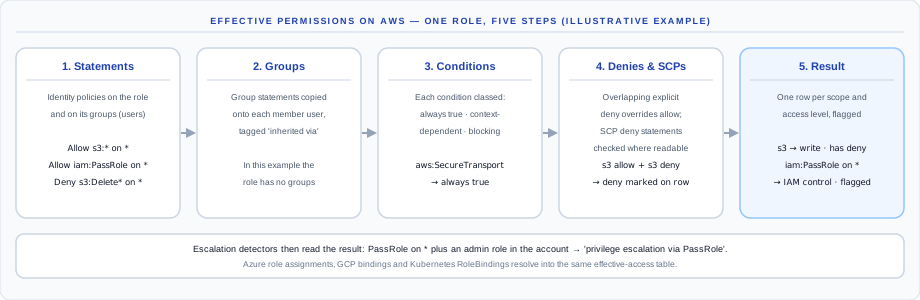
AWS: the five steps
1. Collect statements
Every identity-based policy statement — managed and inline, on users, roles and groups — is recorded with its effect, actions, resources and conditions.
2. Expand groups
Statements attached to a group are copied onto each member user and tagged inherited via that group, so a user's effective access includes what it gets through its groups. Admin access that arrives this way raises its own finding.
3. Classify conditions
Each condition is classed from an attacker's point of view, and the worst class across a statement's keys wins:
| Class | Meaning | Examples |
|---|---|---|
| Always true | An attacker meets it trivially | aws:SecureTransport, aws:RequestedRegion, aws:UserAgent |
| Context-dependent | Met if the attacker controls the principal | aws:MultiFactorAuthPresent, session tags |
| Effectively blocking | Needs out-of-band access | source IP, VPC endpoint, organisation membership, sts:ExternalId |
4. Net out denies and check SCPs
An explicit deny overrides an overlapping allow, unless the deny's own condition is one an attacker cannot meet. Overridden rows are kept and marked, so you can see that a grant exists but is denied. Where Onam can read your AWS Organization, SCP deny statements are checked and blocked grants are marked SCP-blocked.
5. Record access level and flags
Each resulting row carries:
| Field | Values |
|---|---|
| Access level | admin · IAM control · write · read · list · tagging |
| Admin | the grant is admin-equivalent |
| Cross-account | the grant crosses an account boundary |
| Net allow | false when a deny overrides it |
| SCP-blocked | an SCP deny statement blocks it |
What is not modelled yet
Say this out loud before you rely on the result:
- Granularity. Rows are kept per statement and service, not per individual API action.
- Allow-list SCPs (an SCP that permits only listed services) are not modelled; only SCP deny statements are.
- Permission boundaries are recorded but do not yet reduce effective access.
- Resource-based policies (S3 bucket policies, KMS key policies and similar) are collected and feed Attack Path, but are not folded into the effective-access table.
- Session policies are not modelled.
Azure, GCP and Kubernetes
- Azure. Role assignments are joined to their role definitions, the scope is classified — management group, subscription, resource group or resource — and ABAC conditions on assignments are evaluated. Entra group membership is not expanded.
- GCP. IAM bindings on projects, service accounts and data resources (buckets, BigQuery datasets, Pub/Sub topics) become effective-access rows, with GCP roles mapped onto the same access levels.
- Kubernetes. RoleBindings and ClusterRoleBindings are resolved to service accounts and their rules; secrets access and pods/exec are treated as their own high-risk levels.
OCI, Alibaba Cloud and IBM Cloud are analysed at the policy level for escalation and hygiene, without an effective-access table.
Looking it up in the console
Open IAM Security → Effective Access and search for a principal by name, ARN or service account. The detail view groups the identity's access by resource type and shows the access level, allow or deny, the first actions, where a grant was inherited from, and the admin, cross-account and SCP-blocked flags.