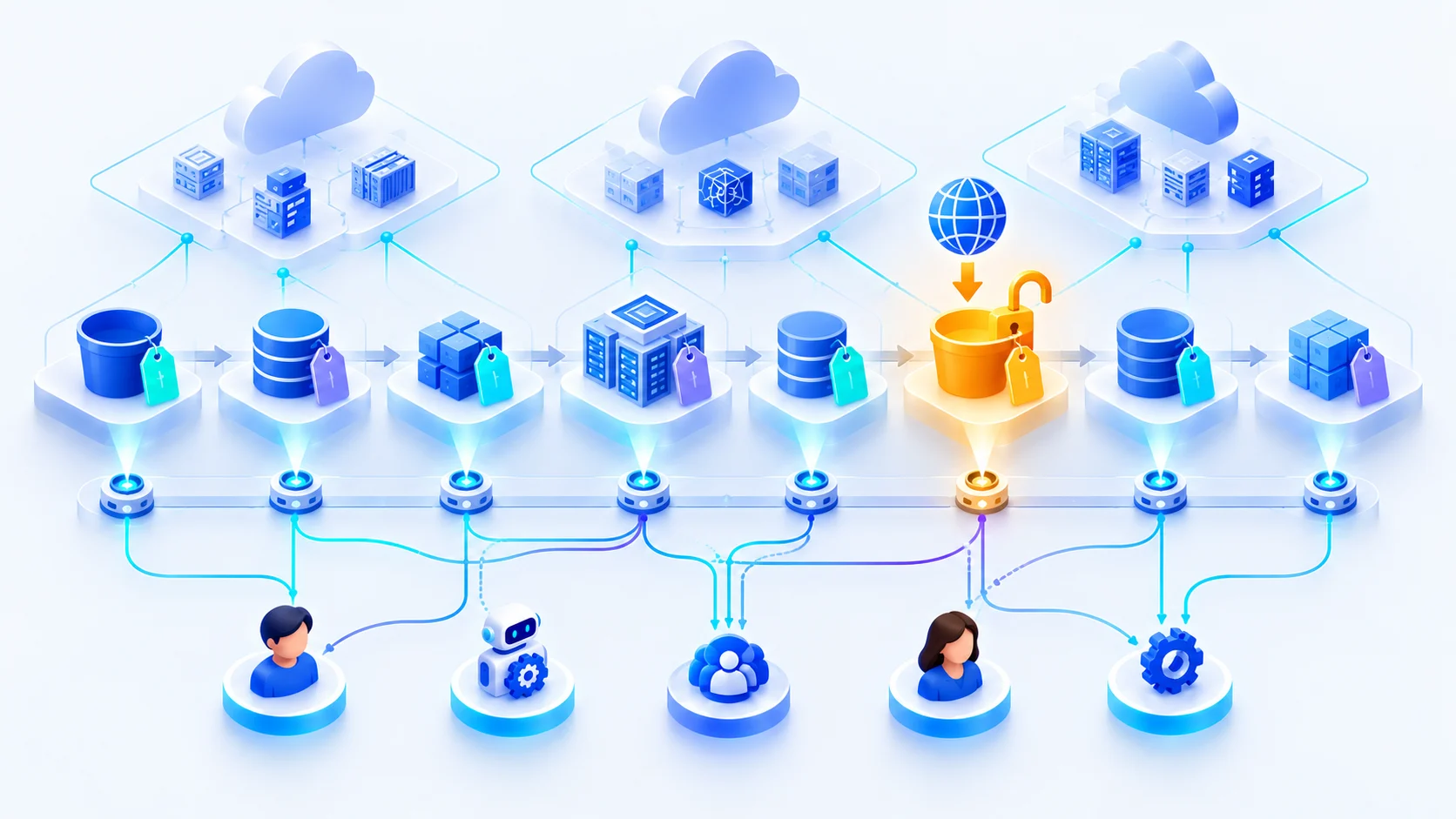
You had one production database in 2019.
Today you have that database, three read replicas, an analytics warehouse, a dozen buckets holding exports, a stream feeding a data lake, and a disaster-recovery copy in another region. Each was created for a good reason by someone who has since moved teams. Nobody can say which of them hold customer data, which are reachable from outside, or where the nightly export actually lands — until an auditor asks for the map.
A store is only as safe as its weakest grant
One wildcard principal, one ACL grant to all users, one bucket policy that trusts a partner account — any of them turns a well-encrypted store into an exposed one. The setting that matters is rarely on the store's summary page.
DSPM — Data Security Posture Management in two minutes
Voices are AI-generated. More short Q&A videos: Onam Security: cloud security
The mechanism, not the marketing
- 1
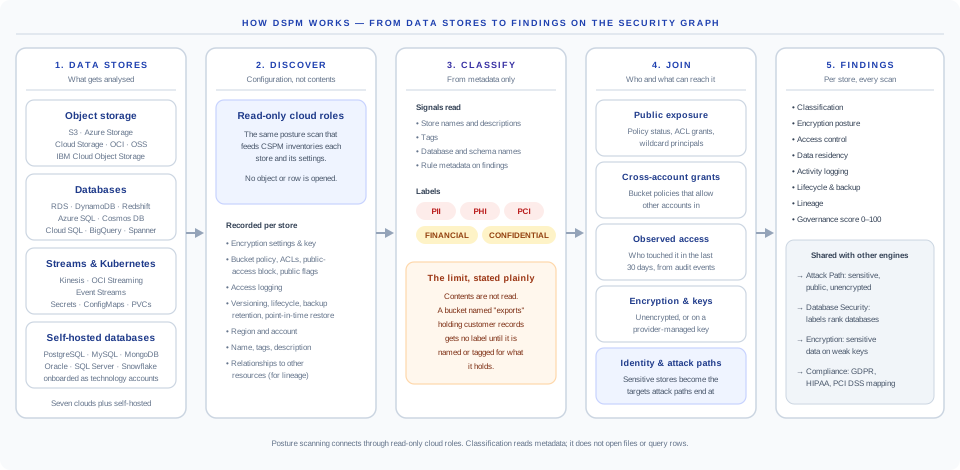
Discovery: the posture scan inventories every data store through read-only cloud roles — object storage, managed databases, warehouses, streams, Kubernetes secrets and ConfigMaps — and records encryption, bucket policy, ACLs, public-access settings, logging, versioning, backup retention, region and the store's relationships to other resources. Self-hosted databases you onboard as technology accounts join the same inventory.
- 2
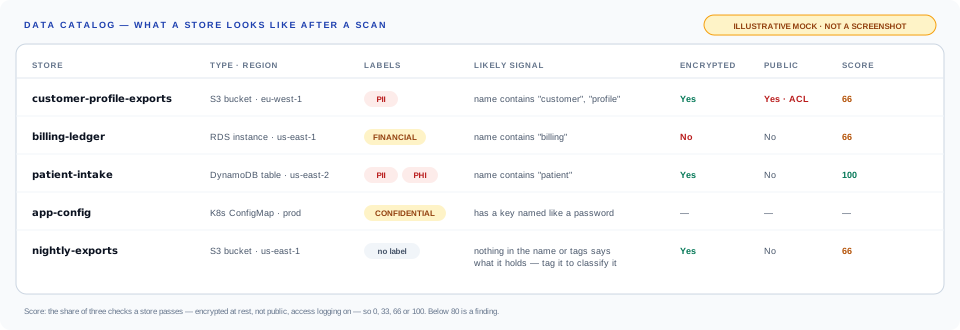
Classification from metadata: store names, descriptions, tags, database and schema names, and the metadata on matching rules are turned into PII, PHI, PCI, financial and confidential labels. No object is opened and no row is queried — because every signal is something you can read in the store's own configuration, the reason for a label is never a black box.
- 3
Exposure: a store is public only when an actual grant makes it so — the provider's own policy verdict, an ACL grant to all users, or a wildcard principal — each checked against the matching public-access block. Bucket policies that let another account in are flagged separately, and write access from outside is ranked critical.
- 4
Who reaches it: observed access from cloud audit events over the last 30 days — which principals touched each store, with which operations, and when — sits next to the policy view. Classification, public access and encryption are written to the security graph, so attack paths that end at a sensitive store are scored as reaching a crown jewel.
- 5
Lineage: relationships discovery already records — replication, backup, ETL writes, streaming, export and import — are linked into chains from the original source, up to eight hops, with every cross-region and cross-account hop flagged.
- 6
Findings, every scan: each store is checked for classification, encryption, access, residency, logging, lifecycle and lineage, and given a 0–100 governance score. The same labels rank Database Security findings and drive the Encryption engine's sensitive-data checks.
Specific outputs, measurable outcomes
DSPM — Data Security Posture Management in the real console.
A recreation of the Onam console with sample data — the screens and finding types your team works with.
DSPM, Database Security and Encryption share one scan
They answer different questions about the same data. DSPM decides what is sensitive; the other two use that label to rank what they find.
What data do we hold, where, and how exposed is it?
- Covers:
- Every kind of store: buckets, databases, warehouses, streams, Kubernetes secrets.
- Gives you:
- Labels (PII, PHI, PCI, financial, confidential), public and cross-account exposure, lineage.
Is each database hardened, private, audited and backed up?
- Covers:
- Managed and self-hosted databases, down to CIS benchmarks for the engine itself.
- Gives you:
- A six-domain posture score per database, ranked higher where DSPM found sensitive data.
Is it encrypted, with a key we control, and who does the key let in?
- Covers:
- KMS keys, vaults, certificates and secrets managers across every cloud.
- Gives you:
- Coverage, key-policy reach, rotation and drift — and sensitive stores on weak keys.
How the labels pass between them is set out in the DSPM documentation.
From a list of stores to findings on the graph
DSPM runs inside every scan, after the posture checks. It reuses what the scan already read about each store, so there is nothing extra to connect.
Five views of access, side by side
A label on its own is a list. What makes it a priority is how the store can be reached — so each store carries all five.
Public only when a real grant makes it so: the provider's own policy verdict, an ACL grant to all users, or a wildcard principal — each checked against the matching public-access block. The finding names the grant.
Bucket policies are read statement by statement. An Allow to a principal in another account is flagged; write access from outside is critical, and read access is raised to critical when object reads were seen in the last day.
Cloud audit events from the last 30 days, grouped per store: how many accesses, how many distinct principals, which operations, and when it was last touched.
The Encryption engine reads DSPM's labels: sensitive data on an unencrypted store is critical, sensitive data on a provider-managed key is high, and key policies are checked for wildcard and outside principals.
Classification, public access and encryption are written to the security graph. A path that ends at a sensitive, public or unencrypted store is scored as reaching a crown jewel.
What it does not do today: compute, for every store, the complete list of identities whose effective permissions allow a read. Identity-by-identity permissions are in CIEM, on the same graph.
Every label traces back to something you can read
Labels come from metadata, so the reason is always something you can read and change: a name, a tag, a schema.
- Store names and descriptions
- Tags
- Database and schema names, for self-hosted databases
- Key names in Kubernetes ConfigMaps
- The metadata on posture rules that matched the store
- Objects or files in a bucket
- Rows in a table
- Messages on a stream
- Secret values
The trade-off: a store named for what it holds is labelled; one named "exports" is not, until you tag it.
Where the data goes after it lands
Replication, backup, ETL writes, streaming and exports are linked into chains from the original source. Each hop that leaves a region or an account is flagged — the moments a copy escapes the controls on the original.
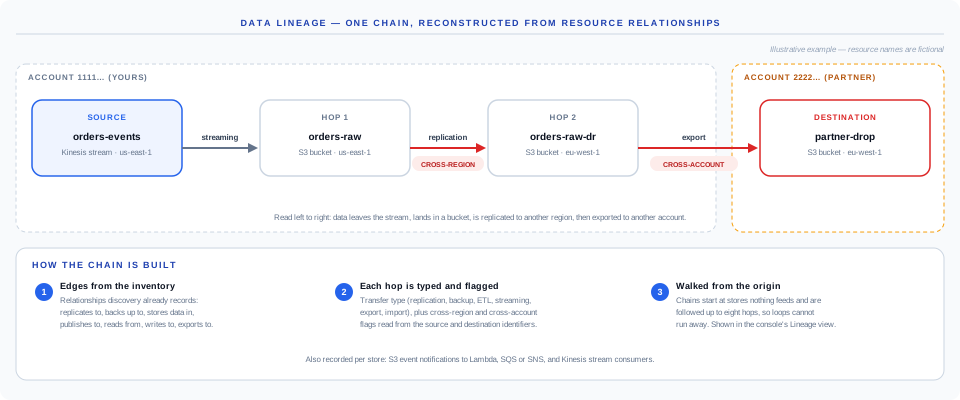
Lineage comes from the relationships the cloud's own configuration describes. A copy made by a script with no trace in configuration is outside its view. How chains are built
Store types analysed, cloud by cloud
These get the full set of DSPM checks. Other data services — DocumentDB, Neptune, Timestream, queues and more — are covered by the storage and database posture rules.
| AWS | S3 buckets, RDS instances and Aurora clusters, DynamoDB tables, Redshift clusters, Glue databases, OpenSearch domains, Kinesis streams; Lake Formation grants |
|---|---|
| Azure | Storage accounts, Data Lake Storage, Azure SQL servers, Cosmos DB, Synapse workspaces, Key Vault |
| Google Cloud | Cloud Storage buckets, Cloud SQL, BigQuery datasets, Spanner, Firestore, Secret Manager |
| Oracle Cloud | Object Storage buckets, Autonomous Database, NoSQL tables, Streaming |
| Alibaba Cloud | OSS buckets, ApsaraDB RDS, PolarDB, Tablestore, MaxCompute projects |
| IBM Cloud | Cloud Object Storage buckets, Databases for PostgreSQL and other managed databases, Cloudant, Event Streams |
| Kubernetes | Secrets, ConfigMaps (credential-like keys), persistent volume claims, StatefulSets |
| Self-hosted | PostgreSQL, MySQL, MariaDB, SQL Server, MongoDB, Oracle, Cassandra, IBM Db2 and Snowflake, once onboarded as technology accounts |
The detail, written down
What DSPM does, the five stages, and how it connects to the rest of Onam
Which stores are found and what is recorded about each
The signals behind every label, and what metadata cannot tell you
Public grants, other accounts, observed access and attack paths
Encryption checks, the governance score and region rules
How chains are built, what each hop records, what is out of view
Every check, its severity and what passes it
Store types per cloud and per-service notes
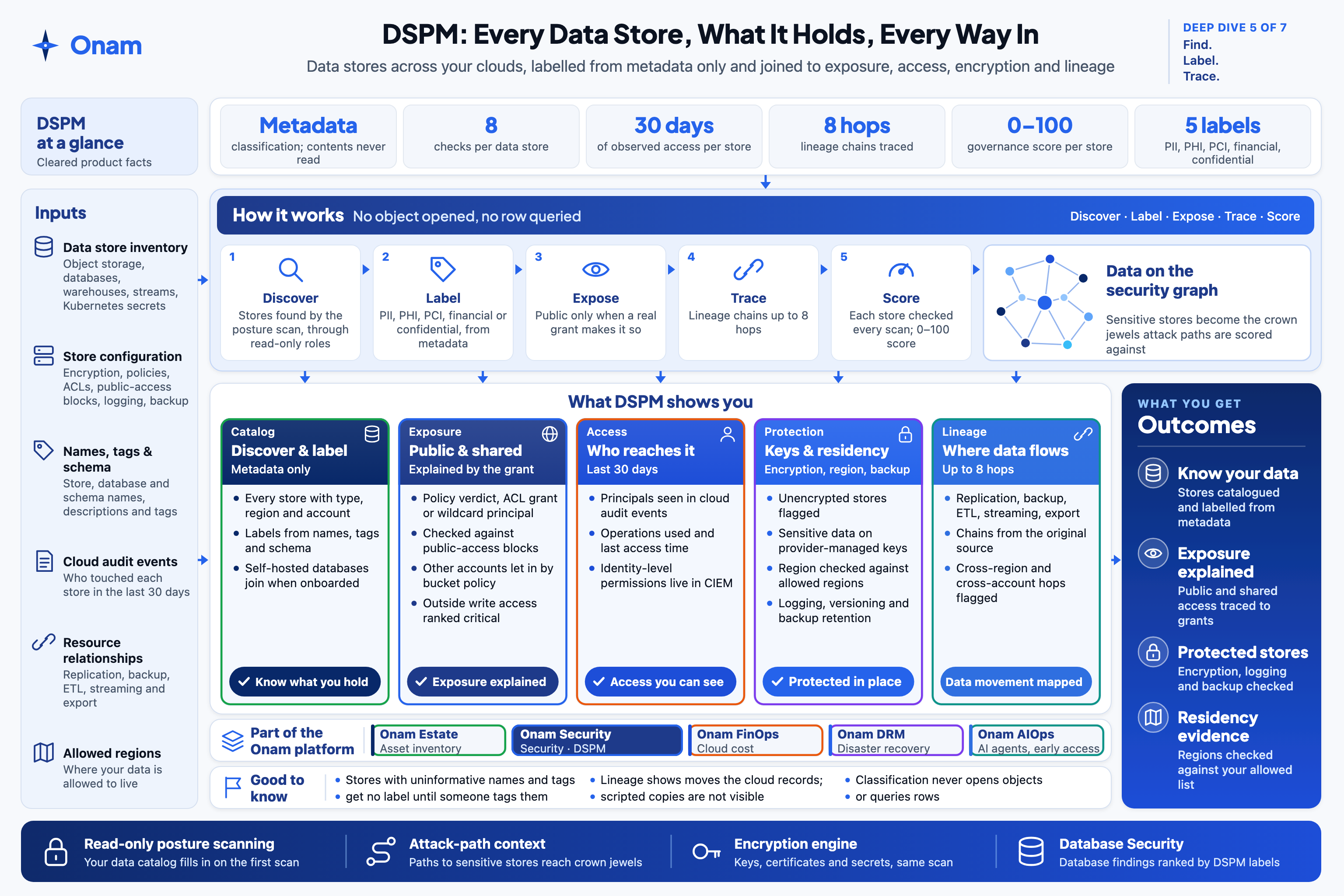
Data security (DSPM) on one page
Inputs, how it works, what you get and the limits — the same sheet our team uses in briefings.
 Open full size
Questions we get a lot
Ready to see DSPM — Data Security Posture Management in your cloud?
Posture scanning connects through read-only cloud roles. Your data catalog fills in on the first scan.