Dynamic testing (DAST)
Dynamic testing exercises a running web application or API from the outside, the way an attacker would.
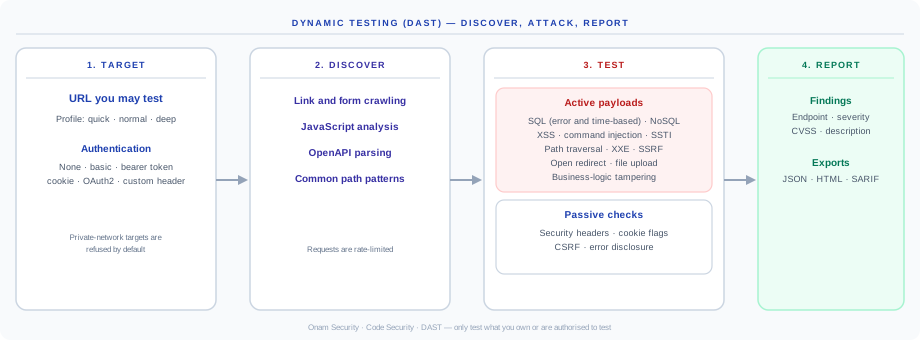
Only test applications you own or are explicitly authorised to test. The payloads are real injection attempts. Use a staging environment that mirrors production.
Starting a test
- Console: add a DAST Target URL in the New Security Scan dialog. The test runs alongside the repository scan.
- API:
POST /api/v1/secops/dast/scanwith the target URL, a profile and optional authentication.
| Setting | Options |
|---|---|
| Profile | quick (default), normal, deep |
| Authentication | none, basic, bearer token, cookie, OAuth2, custom header |
Targets on private networks are refused by default.
Discovery
The scanner builds an endpoint inventory from link and form crawling, analysis of the app's JavaScript, an OpenAPI description if the app publishes one, and common path patterns. Requests are rate-limited. Full browser rendering of single-page apps is not part of the deployed scanner, so publishing an OpenAPI description gives the most complete coverage.
Checks
| Kind | Checks |
|---|---|
| Injection | SQL (error-based and time-based blind), NoSQL, command, server-side template injection, cross-site scripting |
| Server-side | Path traversal, XXE, SSRF |
| Application logic | Open redirect, file upload handling, parameter and method tampering, forced browsing |
| Passive | Security headers, cookie flags, CSRF protection, error and stack-trace disclosure |
Results
Each finding records the endpoint, vulnerability type, severity, CVSS and a description. Results show on the DAST tab and the DAST scan page (total findings, critical and high, endpoints, attacks sent). Reports are available as JSON, HTML or SARIF from GET /api/v1/secops/dast/scan/{scan_id}/report?format=json|html|sarif.
Credentials for the target
Authentication details are passed to the scan job that tests your app. Use a dedicated test account with the least access the test needs.
DAST findings are about endpoints, not source files, so they are not traced to a line of code and AI Code Fix does not apply to them.