Data lineage
How Onam links replication, backup, ETL, streaming and export hops into data lineage chains, and flags copies that cross regions or accounts.
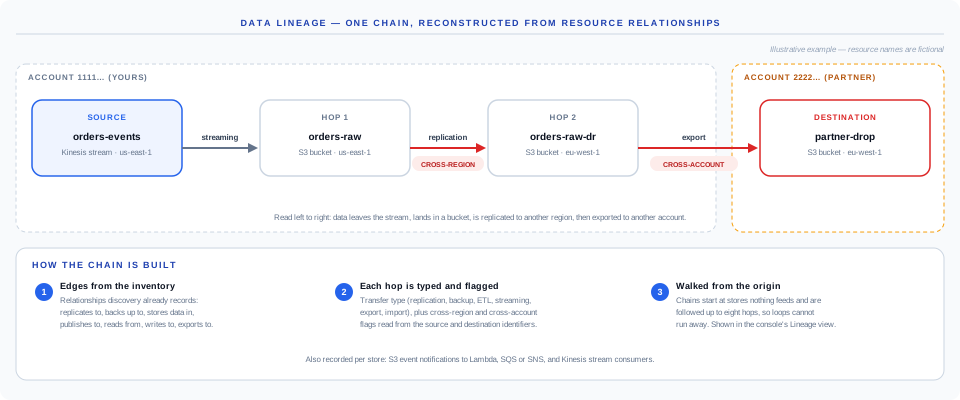
How a chain is built
- Edges come from the inventory. Discovery records relationships between resources. Those that move data — replicates to, backs up to, stores data in, publishes to, subscribes to, reads from, writes to, exports to, imports from — become lineage edges.
- Each hop is typed and flagged. The relationship maps to a transfer type: replication, backup, ETL, streaming, read, write, export or import. Source and destination regions and accounts are read from their identifiers; a hop between two regions is flagged cross-region, a hop between two accounts is flagged cross-account.
- Edges are walked into chains. Chains start at stores nothing feeds — the true origins — and follow each path up to eight hops, which stops a cycle from running forever. If no multi-hop chain exists, each edge is shown on its own.
Chains appear in the console under Data Security → Lineage (/ui/datasec/lineage).
Per-store lineage records
Alongside chains, each store records its own outbound flows where the configuration shows them: S3 event notifications to Lambda, SQS or SNS, and the registered consumers of a Kinesis stream. These are informational — they describe where data goes, not a misconfiguration.
Why the flags matter
A copy is protected by the controls where it lands, not where it started. A replication hop into another region can move regulated data out of its permitted geography even when the source bucket passes every residency check; an export hop into another account hands the copy to that account's controls. The flags mark exactly those moments.
What lineage cannot see
- Movement with no configuration trace. A script, notebook or scheduled job that copies files using its own credentials leaves no relationship in the cloud's resource configuration.
- Transformations inside a job. Lineage records that an ETL job writes to a store, not which fields it carried.
- Volumes. Records per day are shown only where a source provides them; most do not.
Encryption in transit and a per-chain risk grade appear in the lineage view where the underlying relationship records them. Most relationships do not carry those fields yet, so treat the cross-region and cross-account flags as the dependable signal today.