Specialist AI agents that investigate your cloud — and change nothing without your approval.
Onam Operations is a workspace where your team works alongside specialist agents that already have your cloud estate in context. They plan a multi-step investigation, run it across domains, show the evidence for every number, and propose changes for a person to decide. Every step is recorded.
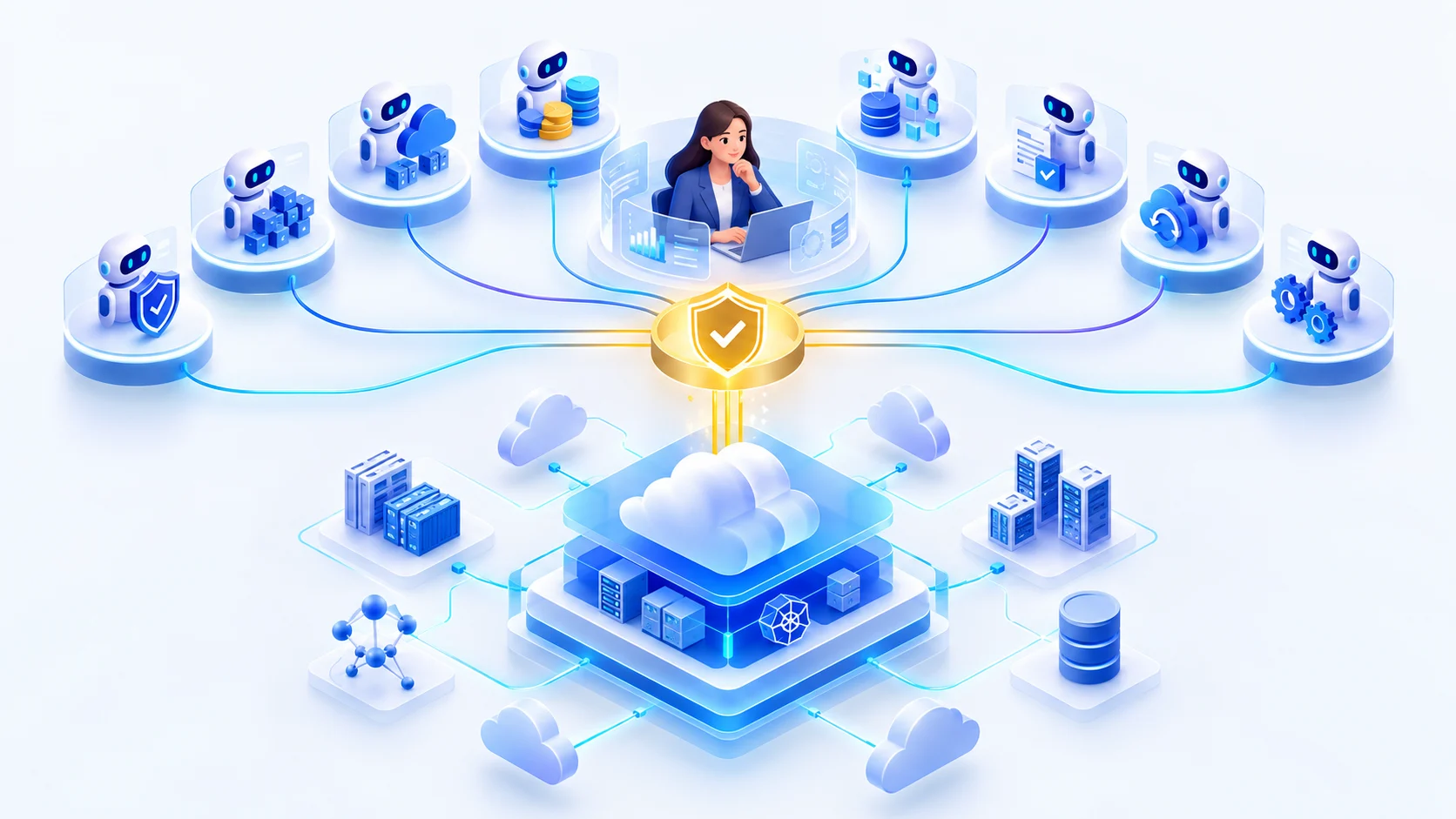
Illustration of the design. Some agents are in early access or on the roadmap — see availability below. No change reaches your cloud without approval.
Status, stated plainly
What you can use today, and what is still coming
Onam Operations is new. We label every capability on this page so you never have to guess whether something exists. Nothing marked “On the roadmap” is available, and no date is promised for it.
Available
In Onam Security today, for every customer.
AI Assistant in Onam Security
Ask questions about your posture in plain language; specialists query your findings and cite them. Read-only.
Early access
Running on the Onam platform and enabled per organisation by invitation. Agents answer and propose; nothing changes your cloud.
Agent workspace
Chat with the agents, each reply attributed to the agent that produced it, with a context panel for evidence, tasks and actions.
Orchestrator and visible plans
A multi-step question becomes a plan you can see — which agent, which skill, in which order — before and while it runs.
Asset Agent and Security Agent
Over the Onam Security inventory and findings, on AWS first.
Evidence on every claim
Each number cites the skill, tool, query, rows and scan time that produced it.
Approval centre
One queue for every proposed change, diff first, with rollback and blast radius shown before the decision.
Activity and audit trail
Every turn, tool call, decision and approval recorded append-only, with a hash-chain check that nothing was edited.
Reports
A conversation or task exported with its evidence preserved.
Kill switch and autonomy ceiling
Stop all agent activity for your organisation; cap how far agents may go — read, analyse, recommend, simulate, propose.
In development
Built or specified; its data feed or enablement is not in place yet.
Compliance Agent and Data Agent
Built; waiting on the compliance-results, exposure and relationship feeds into the estate layer.
Change proposals with rollback
Automation Planner proposals with exact change, rollback and dry run; blast-radius inputs are being connected.
Pre-built workflows
Multi-step procedures such as audit preparation and exposure remediation, with approval steps built in.
On the roadmap
Designed, not offered. No date is promised.
Executing approved changes
The actor applies an approved change in an isolated sandbox, validates it and rolls back on failure. Built and tested; enabled for no customer.
FinOps, DR and Architecture agents
Cost, recovery and design reasoning across the estate.
Cost and recovery data (Onam FinOps, Onam DRM)
Joining exposure with cost and recoverability in one answer.
Azure, Google Cloud and Kubernetes actions
AWS first; the design keeps provider specifics inside tools so agents do not change.
Event triggers and a workflow builder
Start investigations from events; compose workflows that cannot publish an execute step without an approval step.
Customer-authored agents
Needs a sandbox and certification model that does not exist yet.
The answer exists. It is spread across four consoles.
A real question about a cloud estate — “which internet-exposed production assets hold regulated data, what do they cost, and would we get them back if the region went down?” — touches security, inventory, cost and recovery. Each lives in its own console. Today a senior engineer opens all four, exports four spreadsheets and joins them by resource ID by hand.
Today, by hand
Four consoles, four exports, one spreadsheet join
Half a day to a week of a senior engineer’s time
Stale the moment it is finished
No evidence anyone can audit — a screenshot at best
The fix happens out of band, unlogged
With Onam Operations
Ask once; the orchestrator plans the steps across agents
Each agent narrows the previous one’s result — nothing re-discovers the estate
Every number cites the query, rows and scan time behind it
Disagreements between agents reach you, never silently resolved
Changes are proposed with a diff and a rollback, and a person decides
In early access the agents read the Onam Security inventory and findings. Joining cost and recovery into the same answer is on the roadmap, as those data sources are connected.
The agent workspace
Shaped like team chat. Behaves like an operations console.
The workspace looks familiar because chat is already in your muscle memory. But chat alone cannot carry a plan, an approval or an audit trail, so three rules set it apart.
Every claim is inspectable
Numbers and names in an agent’s reply link to the skill, query, rows and scan time that produced them.
The plan is visible before it runs
A multi-step request shows its steps first, so you can stop it before it works — not only after.
Actions look like changes, not messages
A proposed change is a distinct card: bordered, diff first, with explicit decision buttons.
Onam Operations · ChatIllustrative · sample data
# Exposed production assets
Agents in this conversation: Asset · Security
Which production assets are reachable from the internet, and which of them have critical findings?
Plan · 2 stepscomplete
✓Assetdiscover_assets214
✓Securityquery_findings12
AsAsset Agentdiscover_assets · 214 rows
214 production assets in the selected accounts; 61 have no owner tag.
SeSecurity Agentquery_findings · 12 rows
12 of them carry a critical finding. The top three allow SSH from 0.0.0.0/0. evidence E-101
1 recommended change · approval required · Review
Ask the agents… (@Security to target one)Send
Chat with the agents: navigation on the left, each agent’s reply in its own attributed card, and a context panel for evidence, tasks and actions. Illustrative mockup drawn from the design specification with sample data — not a screenshot of a customer environment.
Needs you
Home, the approval queue and your inbox
Ask
Chat, the assets the agents see, and the agent directory
Run
Tasks, workflows and reports
Govern
Knowledge you give the agents, the activity record, and settings including the kill switch
The specialist agents
Eight specialists, each with a declared job and a declared limit
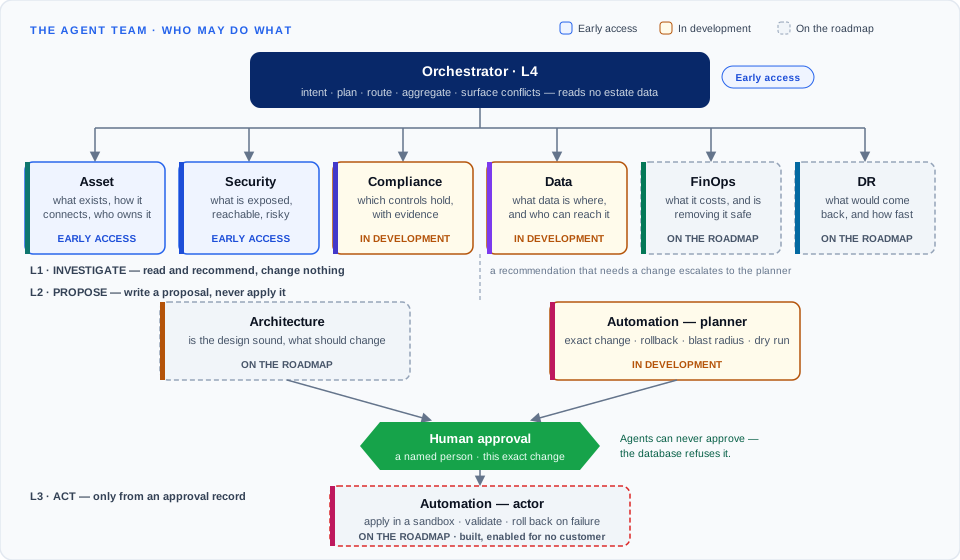
Each agent is a versioned definition, not a prompt: its purpose, level, skills, tools and permissions are data that can be reviewed. An agent invokes skills; skills invoke tools; only tools touch anything outside the platform. Automation works in two modes — a planner that proposes and an actor that may execute only from an approval.
Who may do what. L1 agents read and recommend; L2 agents write proposals only; the L3 actor runs only from an approval record.
Asset Agent
Early access
L1 · Investigator · Read and recommend
“What do we have, how is it connected, and who owns it?”
Finds and summarises assets by cloud, account, region, type, environment and criticality
Maps relationships and dependencies between resources
Attributes ownership from tags and records, stating the source and confidence — or saying the owner is unattributed
Full definitions — skills, tools, permissions and known limits for every agent — are in the agent reference.
The orchestrator
It routes the work. It never answers on its own.
The orchestrator turns a request into a plan: it detects the intent, picks the agents, orders the steps — in parallel where nothing depends on anything else — passes each step the previous step’s result, and joins the answers. It has no access to estate data itself, so it cannot answer a question unaudited.
Plan cardIllustrative · sample data
Plan · 4 stepspaused for approval
✓Assetdiscover_assets214
✓Securityquery_findings12
✓Securityrecommend_remediation1
…Automationbuild_change_artifact—
Step 4 changes the cloud, so the plan stops here until a person approves it.
A plan pauses where a step would change the cloud, and waits for a person. Illustrative mockup drawn from the design specification with sample data — not a screenshot of a customer environment.
QuestionAnswered by one agent.
“How many production instances are in this account?”
InvestigationSeveral agents, results joined.
“Which exposed assets have critical findings, and who owns them?”
Action requestA plan, a proposal and an approval.
“Close SSH from the internet on these instances.”
ReportA synthesised document with its evidence.
“Give me the exposure summary for the board.”
Conflicts reach you. If one agent says “remove this” and another says “it is a recovery dependency”, the orchestrator does not pick a winner. Both positions and their evidence are shown, and you decide. A silently resolved conflict is a wrong answer in a confident tone.
Approval and governance
The approval gate is the product, not a setting
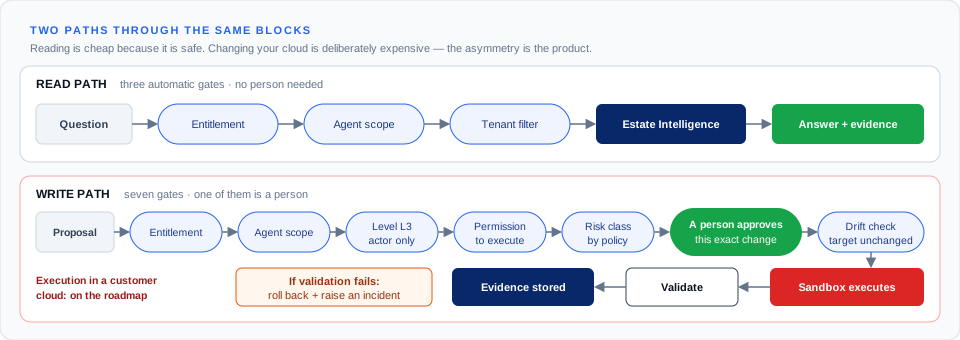
There is no autonomy level, tenant setting or flag that lets an agent change your cloud without a recorded human approval. Risk is assigned by policy — never by the agent — and can only be raised automatically, never lowered: production targets, crown-jewel paths, regulated data, missing rollback and bulk changes all push a change up a class.
Approval centreIllustrative · sample data
Approval requiredHIGH
Restrict SSH ingress — sg-example · prod-web-tier
Requested by Automation planner · task T-example
Change
- 0.0.0.0/0 tcp/22
+ 10.20.0.0/16 tcp/22
Blast radius
4 instances · 1 auto-scaling group · 2 business services
⚠ 2 SSH sessions from outside 10.20.0.0/16 in the last 24h
Why
Critical finding F-example · on a path to a crown-jewel database · evidence E-101
Rollback
Restore the previous rule · pre-state captured · reversible
Bound to change hash (sample) · expires in 7 days · target re-checked before execution
ApproveRejectModifySimulate
The approval card leads with the exact change, then blast radius, reason and rollback — the approver’s first question answered before it is asked. Illustrative mockup drawn from the design specification with sample data — not a screenshot of a customer environment.
Risk
Who must approve
For example
Low
None
Any read or analysis; adding a tag; enabling a log
Medium
One approver
Resizing a non-production instance; encrypting a new bucket
High
One approver plus a dry run
Narrowing a production security group; changing a production IAM policy
Critical
Two distinct approvers, one an organisation admin; dry run; change window
Deleting a production database; changing an organisation-level policy
An approval binds to the change’s hash — approving one change cannot authorise another.
The target is re-read just before execution; if it drifted, the approval is superseded.
Approvals expire. Critical changes need two distinct people.
Agents can never hold approval authority — the database refuses to record it.
Review time is measured, so rubber-stamping becomes visible to admins.
Reading is cheap because it is safe. Changing your cloud is deliberately expensive.
Evidence and audit trail
A claim without evidence is a defect
Every factual claim an agent makes carries the skill, the tool, the query, the rows and the scan it came from. When the data cannot support an answer, the agent says it cannot verify it. Every turn, tool call, decision and approval is written to an append-only record, chained so that an edit or a deletion is detectable.
Evidence cardIllustrative · sample data
Evidence E-101copy
Claim
12 production assets carry a critical finding
Agent
Security Agent · L1
Skill
query_findings v1.0
Tool
cei.query
Query
Q-example · show query
Rows
12 of 12 (not truncated)
As of
sample time · scan example
Source
security findings · estate assets
Re-runOpen
Open any number to see how it was produced, and re-run it. Illustrative mockup drawn from the design specification with sample data — not a screenshot of a customer environment.
Activity · audit trailIllustrative · sample data
Hash chain: intact — no record edited or removed
Time
Actor
Event
Target
Risk
14:02:11
you
conversation.started
—
Low
14:02:13
Orchestrator
plan.created
4 steps
Low
14:02:19
Asset Agent
tool.called · cei.query
214 rows
Low
14:02:27
Security Agent
tool.called · cei.query
12 rows
Low
14:07:40
Automation planner
approval.requested
sg-example
High
14:21:05
you
approval.approved
hash (sample)
High
Who did what, when and why — people and agents alike — with a check that the chain is intact. Illustrative mockup drawn from the design specification with sample data — not a screenshot of a customer environment.
Security architecture
Built on the assumption that the model can be fooled
The controls that protect your cloud do not rely on the model behaving well. They sit in code, in the call path, where a refusal stops the request and is itself recorded. These are design commitments of the platform.
Tenant isolation at every layer
Your data never crosses to another customer — not in a query, cache, memory, model call, event or log line. Each layer is isolated and tested on its own, so one bug is not one breach.
Zero-trust agents
An agent is an untrusted principal. Its scope is verified on every call, it cannot change its own definition or permissions, and it can never exceed the person it acts for.
Prompt-injection defence in code
Text from your cloud is labelled as data, never as instruction. The decisive control is the policy engine and tool gateway: a persuaded model still cannot call a tool its agent does not hold.
One model gateway
All inference goes through one gateway, to approved models only, in the region agreed with you. Customer data is never used to train a model.
Kill switch and budgets
Stop all agent activity for your organisation from settings. Every task has step, time and cost ceilings; when one is reached, the task stops and says what is left undone.
Fail safe
On ambiguity, timeout, missing data or policy doubt, the platform stops and reports. A domain that is unavailable is named in the answer, never hidden.
Five things it will never do
1No change to your cloud without a human approval recorded against a named person. There is no autonomy setting that removes it.
2No data derived from another customer, ever — not in a query, a cache, a prompt, a memory or a log line.
3No answer it cannot ground in a tool call. “Unable to verify” is a designed answer, not an error.
4No agent can widen its own permissions, call an unregistered tool or use a model that is not approved.
5No workflow continues past a failed validation step.
Each use case shows the agents involved, what you get back, and whether a person must approve anything.
Find internet-exposed critical assets
Early access
“Show me critical production assets reachable from the internet.”
Agents
Asset → Security
You get
A table of assets with exposure type, severity and owner, with evidence on every row.
Approval
None — read only
Triage a new critical finding
Early access
“Is this finding real, and what does it actually reach?”
Agents
Security → Asset
You get
The finding in context: the resource, what depends on it, who owns it and a recommended next step.
Approval
None — read only
Identify excessive IAM permissions
Early access
“Which identities have far more access than they use?”
Agents
Security
You get
Identities ranked by unused privilege, each with the policy and finding that shows it.
Approval
None — read only
Review a newly connected cloud account
Early access
“We just connected this account. What should I worry about first?”
Agents
Asset → Security
You get
An inventory summary and the highest-risk findings, ready to export as a report.
Approval
None — read only
Prepare compliance evidence for an audit
In development
“Prove control 8.2 held all quarter.”
Agents
Compliance → Data → Security
You get
Control status with dated evidence assembled into an audit package.
Approval
None — read only
Find sensitive data exposed publicly
In development
“Which public buckets hold regulated data?”
Agents
Data → Security
You get
Data stores by classification and exposure, without ever reading the data itself.
Approval
None — read only
Create a remediation plan
In development
“Plan the fix for SSH open to the internet on these instances.”
Agents
Security → Automation planner
You get
An exact change, its rollback, its blast radius and a dry run, waiting in the approval queue.
Approval
A human decides
Execute an approved security remediation
On the roadmap
“Apply the approved change to the production security group.”
Agents
Automation actor
You get
Applied in a sandbox, validated, rolled back automatically if validation fails, with the evidence package stored.
Approval
Required; two people for critical changes
Decide whether an idle resource is safe to remove
On the roadmap
“Can we delete this idle instance without breaking anything?”
Agents
FinOps → Asset → DR
You get
Cost, dependencies and recovery role checked together before anything is called safe.
Approval
Required to remove
Find business-critical assets with no recovery plan
On the roadmap
“Which of our most critical services would not come back?”
Agents
DR → Asset
You get
Services separated into unprotected, protected-but-untested and validated.
Approval
None — read only
Questions
Common questions
Can I use Onam Operations today?+
It is in early access: running on the Onam platform and enabled per organisation by invitation, starting with AWS and the Onam Security inventory and findings. The AI Assistant inside Onam Security is available to every customer today.
Can the agents change my cloud?+
Not in early access. Organisations start at the “propose” ceiling: agents answer, investigate and propose, and nothing touches your cloud. Executing an approved change is on the roadmap, and even then it needs a named person to approve the exact change, a write role you create in your own account, and it runs in an isolated sandbox that validates and rolls back.
How is this different from the AI Assistant?+
The AI Assistant answers questions about your findings inside the Onam Security console. Onam Operations is a workspace above it: multi-step investigations with visible plans, evidence cards, tasks, an approval centre and an audit trail, run by specialist agents with declared permissions.
Is my data used to train models?+
No. Customer data is never used to train or fine-tune a model. Agents call approved models through one model gateway, in the region agreed with you, one customer's data per call.
What stops an agent being tricked by text in my cloud?+
Resource tags, policy descriptions and finding text are treated as untrusted data and labelled as such. The decisive control is in code: the policy engine and tool gateway check every call against the agent's declared scope, so a persuaded model still cannot call a tool its agent does not hold.
Work alongside agents that show their working.
Early access is by invitation and starts on AWS with your Onam Security data. Agents answer and propose; nothing changes your cloud.