Governance and approvals
How Onam Operations decides what an agent may do, how risk is classified, and how a person approves a change before anything is applied.
The approval centre is in early access. Executing an approved change in a customer cloud is on the roadmap.
Principles, in priority order
- Human in the loop — no configuration allows a change to your cloud without a recorded human approval. There is no flag for this.
- Fail safe — on ambiguity, timeout, missing data or policy doubt, stop and report.
- Least privilege — each agent holds the narrowest scope that does its job, checked per call.
- Explicit authorisation — permission is granted to an agent, organisation, accounts, resource class, tool and action — never implied by a role.
- Evidence-based — a claim with no evidence is a defect.
Permissions
A permission is a tuple: agent · organisation · accounts · resource class · tool · action. The effective permission is the intersection of the agent’s grant, your own authority, your organisation’s policy and the conversation’s scope. An agent cannot exceed the person it acts for, and no agent can ever hold the approve action — the database refuses to record it.
Risk classes
Risk is assigned by policy from the kind of change, resource class, environment, blast radius, reversibility and data sensitivity. An agent never classifies its own risk.
| Risk | Approval | Examples |
|---|---|---|
| Low | None | Any read or analysis; adding a tag; enabling a log |
| Medium | One approver | Resizing a non-production instance; encrypting a new bucket |
| High | One approver plus a dry run | Narrowing a production security group; changing a production IAM policy |
| Critical | Two distinct approvers, one an organisation admin; dry run; change window | Deleting a production database; changing an organisation-level policy |
A change is raised one class automatically when the target is production, is on an attack path to a crown jewel, holds regulated data, supports a tier-1 recovery plan, has no rollback, affects more than ten resources, or falls in a change freeze. Nothing lowers a class. Your organisation may set a higher floor, never a lower one.
What makes an approval real
| Property | Meaning |
|---|---|
| Bound to the change | The approval records the change’s hash; approving one change cannot authorise another |
| Drift-checked | The target is re-read just before execution; if it changed, the approval is superseded |
| Expiring | Default seven days |
| Dual control | Critical changes need two distinct approvers, one an organisation admin |
| Separation of duties | Where enabled, the requester cannot approve |
| Reasoned rejection | A reason is mandatory and fed back to the agents |
| Rollback first | The approver sees the rollback plan before deciding; an irreversible change is approved as irreversible |
| Measured | Review time is recorded, so rubber-stamping becomes visible |
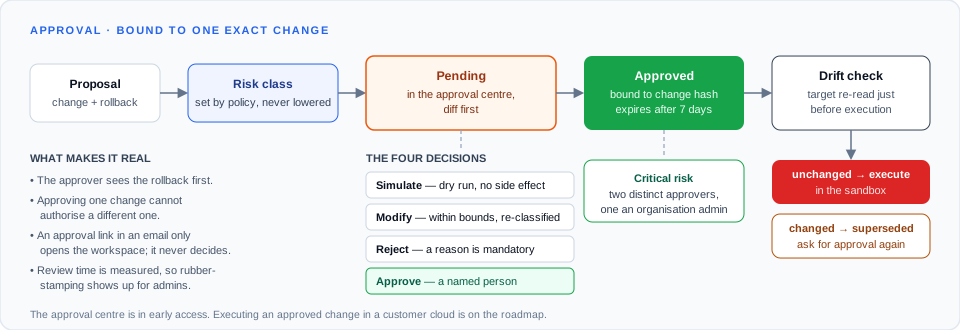
The four decisions
- Approve — records the decision and binds the change’s hash.
- Reject — terminal for this change; a reason is mandatory.
- Modify — change parameters within the bounds the skill declares; risk is re-classified.
- Simulate — a dry run with no side effect, shown before you decide.
An approval link in an email or chat message only opens the workspace — it never decides.
Autonomy ceiling and kill switch
Your organisation sets how far agents may go: read → analyse → recommend → simulate → propose → execute. Early access starts at propose. The kill switch in Settings stops all agent activity for your organisation; tasks in flight are cancelled safely and nothing already executed is reverted.
Audit
Every agent turn, tool call, decision, approval and action is recorded with actor, time, input, output and justification — append-only and hash-chained, so an edit or deletion is detectable. The Activity screen shows whether the chain is intact.