CSPM — Cloud Security Posture Management
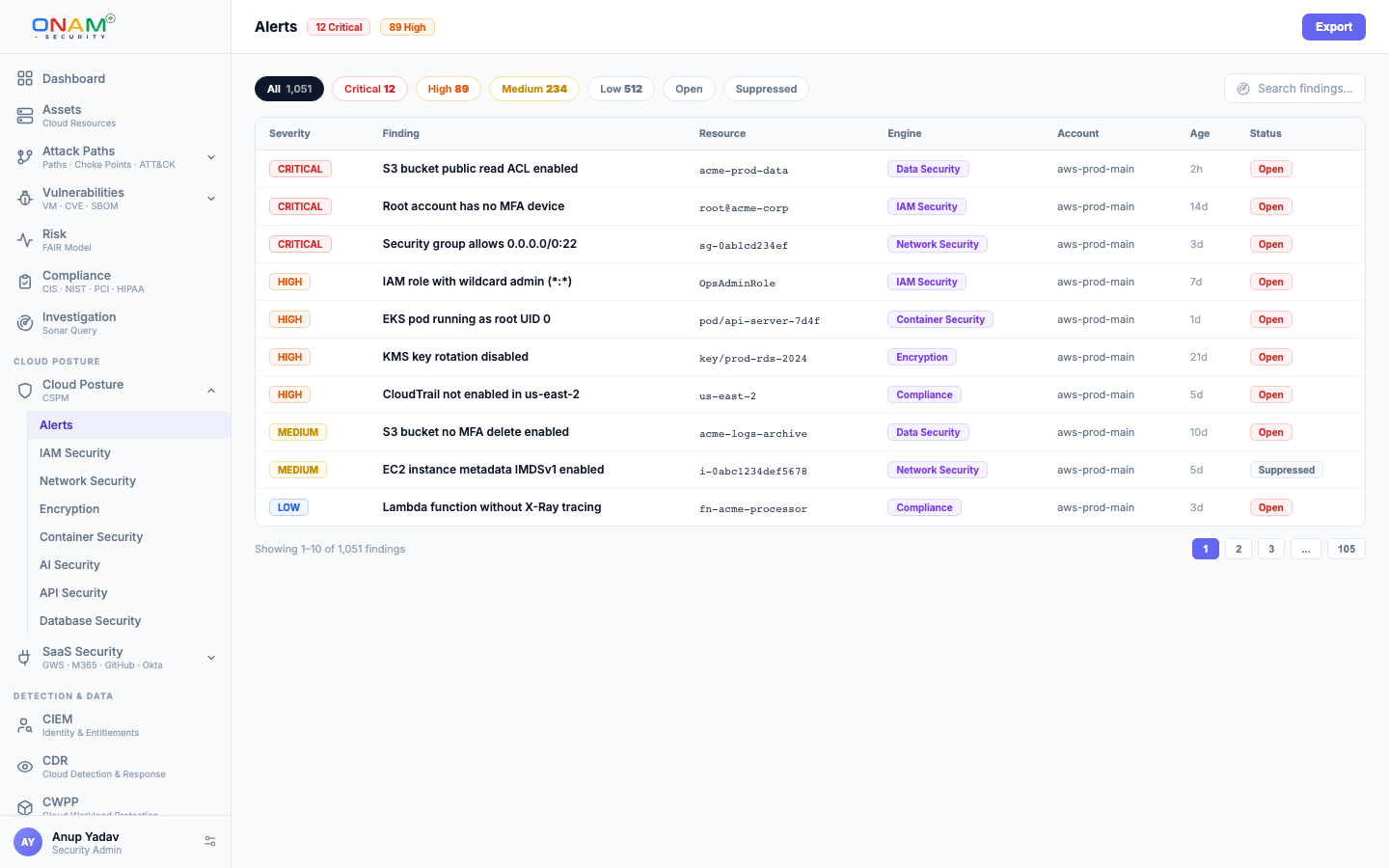
CSPM is the core posture engine of the Onam platform. It evaluates every resource in your connected clouds against 9,853 posture rules, records a PASS, FAIL or ERROR result for each rule-resource pair, and turns every FAIL into a severity-ranked finding with remediation guidance, MITRE ATT&CK mapping, and compliance citations.
This page explains what the rule registry covers per cloud, how a single rule is evaluated, how the severity model works, how to suppress findings you have accepted, and how PASS/FAIL results roll up into compliance scores.
What CSPM checks
CSPM answers one question on every scan: is every resource configured the way it should be? Public buckets, unencrypted databases, permissive security groups, disabled audit logging, missing MFA, stale credentials — each is a rule, and each rule is evaluated on every scan.
- Read-only. Posture scanning connects through read-only cloud roles — the IAM role, service principal, or service account you created at onboarding. Posture scanning installs nothing and modifies nothing in your cloud.
- All 7 clouds. AWS, Azure, GCP, OCI, Alibaba Cloud, IBM Cloud, and Kubernetes are covered by the same rule format and the same finding schema.
- Every finding is actionable. A finding carries the failing resource, the rule rationale, the rule's remediation guidance, the MITRE ATT&CK technique it maps to, the compliance controls it affects, and an AI fix prompt that drafts the CLI command, Terraform change or console steps for your cloud.
CSPM checks deployed resources through cloud APIs. Templates — Terraform, CloudFormation, Kubernetes manifests and Dockerfiles — are scanned before deployment by IaC Scanning in Code Security, which has its own rules, separate from the posture rules.
Rule coverage by cloud
The posture engine runs 9,853 rules across seven clouds:
| Cloud | Posture rules |
|---|---|
| OCI | 2,059 |
| AWS | 2,018 |
| Azure | 1,926 |
| GCP | 1,322 |
| Alibaba Cloud | 1,151 |
| Kubernetes | 824 |
| IBM Cloud | 553 |
Every rule ships with metadata: severity, domain, rationale, remediation guidance, references, compliance mappings, and MITRE ATT&CK tactics and techniques.
How a rule evaluates
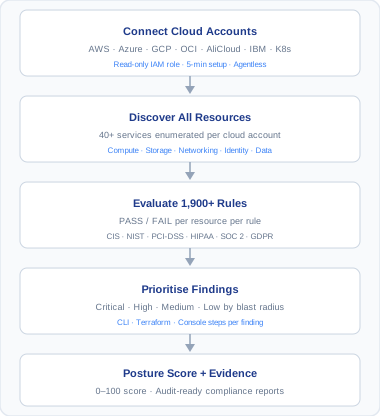
CSPM evaluation is a deterministic pipeline, not a heuristic:
- Discovery. The Discovery & Inventory engine enumerates every resource in the account and records its full configuration in the asset inventory.
- Scoping. The Check engine selects the rules whose scope matches each discovered resource — an S3 bucket is evaluated against S3 rules, a Cognito user pool against Cognito rules.
- Assertion. Each rule references an assertion — a precise condition tested against the recorded configuration. The result is binary: PASS or FAIL.
- Finding creation. Every FAIL becomes a finding with the rule's severity, remediation, MITRE technique, and compliance mappings attached. PASS results are retained too — they are the evidence behind your compliance scores.
Every rule is defined in YAML. This is a real (trimmed) rule from the AWS registry:
rule_id: aws.cognito.userpool.access_keys_rotated_90_days_or_less_when_present
service: cognito
resource: userpool
scope: cognito.userpool.configuration
domain: configuration_and_change_management
severity: medium
assertion_id: security.configuration.cognito_userpool_access_keys_rotated_90_days_or_less_when_present
description: >
  Verifies security configuration for AWS Cognito user pools to ensure
  alignment with security best practices and compliance requirements.
remediation: |
  1. Open the Cognito console and select the user pool
  2. Review current permissions and key usage
  3. Rotate any access key older than 90 days
  4. Prefer IAM roles over long-lived access keys
mitre_techniques:
  - T1098.001
mitre_tactics:
  - persistence
The naming convention is stable across all clouds — <cloud>.<service>.<resource>.<requirement> — so azure.storage.account.secure_transfer_required and gcp.gcs.bucket.uniform_access_enabled are immediately recognizable, filterable, and scriptable.
Custom rules
The Rule Builder lets you author tenant-specific rules in the same YAML format — for example, enforcing your organization's tagging standard or a stricter TLS minimum. Custom rules evaluate in the same pipeline and appear in the same findings stream as built-in rules.
Severity model
Every rule carries one of five severities, set per rule. A finding's severity is then raised when context makes it worse — the resource is on an attack path and exposed, it is a crown jewel, or an active threat touches it — and each finding gets a fix-by date.
| Severity | Meaning | Example |
|---|---|---|
| Critical | Direct, exploitable exposure of data or control plane | Public S3 bucket containing data, root account access key exists |
| High | Serious weakness likely to contribute to a breach | Security group open to 0.0.0.0/0 on a database port, admin without MFA |
| Medium | Defense-in-depth gap or hygiene failure | Access key not rotated in 90 days, missing resource logging |
| Low | Minor deviation from best practice | Non-sensitive resource missing tags, verbose defaults |
| Info | Observation with no direct risk | Inventory facts, deprecated-but-safe settings |
Severity feeds everything downstream: finding sort order, alerting thresholds, the posture score, and the FAIR risk engine, which only quantifies Critical and High findings in dollar terms.
Suppressions and exceptions
Not every FAIL is a problem you intend to fix. A sandbox account, a compensating control, or a vendor requirement can make a finding acceptable. Suppressions record that decision:
- Scope it — suppress by rule, service, technology or provider, for the whole tenant or for one account.
- Explain it — record the reason with the suppression; Onam stores who created it and when.
- Expire it — set an expiry date so the suppression lapses on its own instead of becoming permanent.
- Review it — list active suppressions, or include expired ones, at any time.
Creating a suppression requires admin rights. At the compliance level, exceptions and compensating controls are tracked separately with a justification, an approver and a target date — see Compliance.
Prefer expiring suppressions over permanent ones. A suppression with no expiry is how "temporary" exceptions become invisible permanent risk.
Compliance mapping
Rules are mapped to the controls they evidence across 78 compliance frameworks — including CIS Benchmarks, NIST 800-53, NIST 800-171, PCI DSS, HIPAA, ISO 27001:2022, SOC 2, GDPR and FedRAMP. The mapping is maintained in one catalog, so one scan produces evidence for every mapped framework at once:
- A rule evaluates PASS or FAIL per resource.
- Each result is attributed to every control the rule maps to.
- Per-control pass rates roll up into framework scores in the Compliance view.
There is no separate "compliance scan" — posture and compliance are the same evaluation viewed through different lenses. See Framework Coverage for the full framework list.
Next steps
- Onboard your first AWS account — connect your first cloud
- Compliance — how PASS/FAIL results become framework scores
- Attack Path Analysis — how individual findings chain into attack paths
- Book a demo — see the rule registry against your own environment