Could we recover in time — and how do we know the number is right?
Onam DRM keeps three kinds of recovery figure apart — the targets you require, the figures it predicts from the approved plan, and the actual results of drills you record — because mixing them is how a plan looks better than it is.
In your words
The recovery time in the business continuity plan was agreed in a meeting, and it has been quoted ever since as if it were measured. Nobody can say whether the current architecture would meet it, and the last drill result was compared with whatever the plan said on the day of the report, not what was promised beforehand.
What RTO, RPO & drills shows you
Described from the product documentation — what the view holds, not what we hope it will.
Required, predicted and actual, side by side
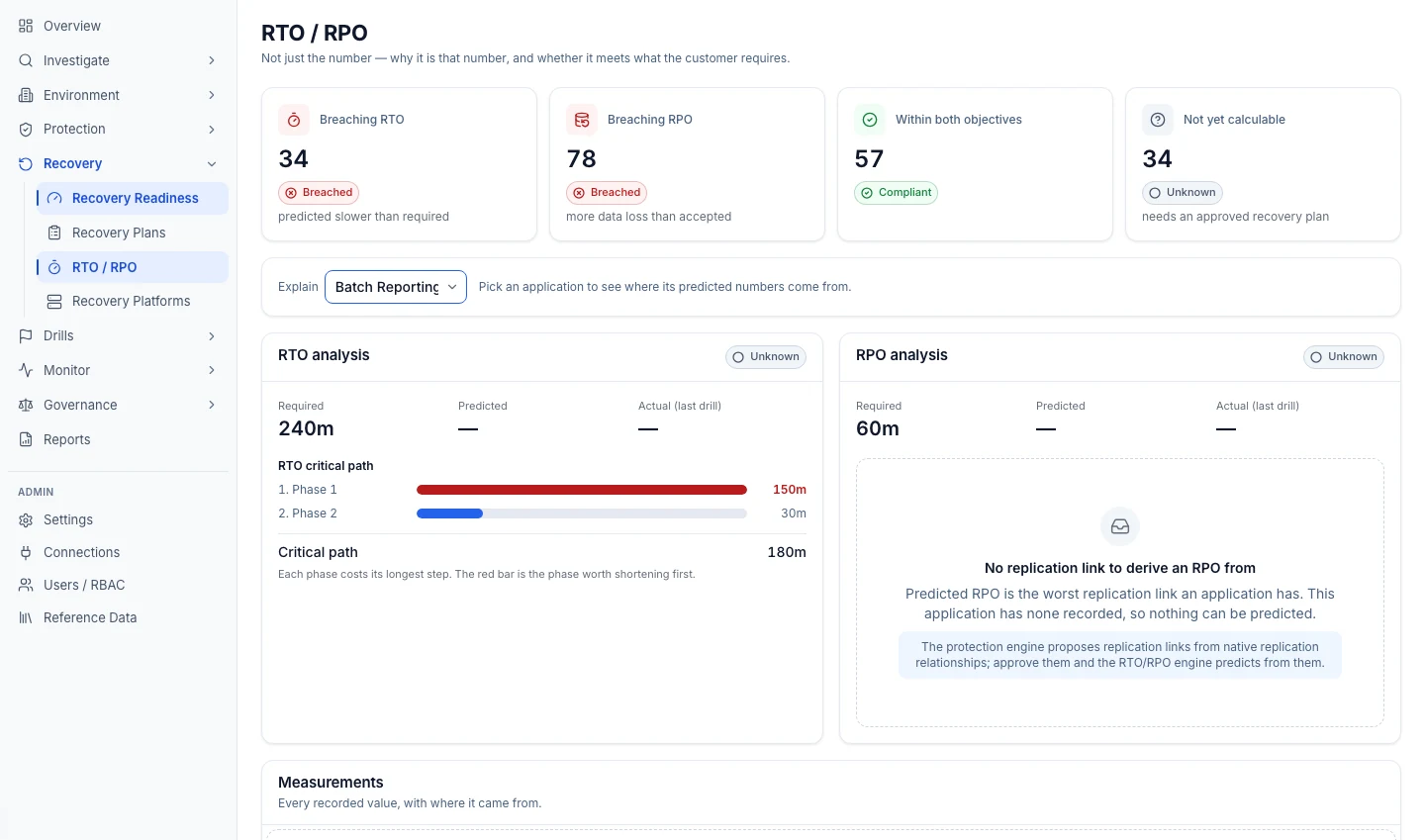
Required figures are what you enter per application. Predicted figures are calculated by DRM. Actual figures come from drills you recorded.
Why a prediction is that number
The RTO critical path is shown phase by phase, so you can see which part of the plan is worth shortening first.
Predicted RPO from the worst link
The worst data-loss window across the application's replication links, taking the larger of the lag last observed and the configured target so a quiet moment does not flatter the figure.
Breaches and blanks
Applications breaching RTO or RPO, those within both, and those whose figures cannot be calculated yet — with the reason, such as no approved plan or no replication link.
Drill records
Drills planned, started and completed in DRM, with the measured recovery time, data loss, success and issues found entered by the person who ran them.
The mechanism, step by step
What RTO, RPO & drills does, in the order it does it.
- 1Enter the required targets
You set the required RTO and RPO for each application. A calculated value never overwrites them.
- 2DRM predicts from approved inputs
Predicted RTO is the critical path through the approved recovery plan; predicted RPO is the worst replication link.
- 3Plan a drill
When you plan a drill in DRM, the prediction at that moment is captured on it.
- 4Run it with your own tools, then record it
The person who ran the drill enters the measured results, and DRM compares them with the prediction captured at planning — not with whatever the model says today.
What it does not do
Knowing where a capability stops is part of deciding whether to buy it.
It does not guess a figure it cannot derive
With no approved plan, or backup-only protection with no recorded frequency, the predicted RTO or RPO stays blank rather than showing zero or a guess.
Your targets are never overwritten
Required RTO and RPO are your inputs. DRM sets its predictions against them; it never replaces them with a calculated value.
It does not run DR tests
Drills run with your own tools are recorded in DRM, with the measured result set against the prediction captured when the drill was planned.
The DR Agent
Onam AIOps agents investigate with evidence on every claim and propose changes a person approves. Nothing changes your cloud without that approval.
DR Agent
On the roadmapOn the roadmap: the DR Agent is designed to calculate realistic recovery time and recovery point, and find business-critical assets with no recovery plan.
On the roadmap: Designed, not offered. No date is promised.
Questions about RTO, RPO & drills
More in Onam DRM
Recovery plans
In what order does each application come back — and is that fast enough?
Explore Recovery plansProtection
What does our cloud configuration say is actually backed up or replicated?
Explore ProtectionBaselines & drift
Has anything changed since we signed off the recovery plan?
Explore Baselines & driftOnam DRM
Disaster recovery management — applications and dependencies mapped, protection read from cloud configuration, predicted RTO and RPO against your targets, and drift from the plan you approved.
The whole productSee RTO, RPO & drills on your own cloud.
Onam DRM runs in the same console and login as the rest of Onam, with read-only access to your cloud.