What can our AI agents do, what data can our AI read, and does it have a guardrail?
A model is only as risky as what it can reach. See the identity, the data and the guardrail.
Onam links each AI service to the identity it runs as and the data stores it reads, marks AI execution identities as AI agents with admin and wide-write findings, and checks that a provider guardrail is attached to your models, deployments and agents.
- provider guardrails checked for presence
- 3
- AI execution identities marked as AI agents
- CIEM
- labels on the stores your AI reads
- DSPM
- data read: links come from configuration
- 0
A Bedrock agent gets a role with administrator access just for the demo, reads a bucket nobody has classified, and has no guardrail attached.
Each setting looks harmless on its own. Together they turn a prompt-injection problem into an account takeover.
The whole picture
From one AI service to everything it can reach
Onam links each AI service to the identity it runs as and the data it reads, flags over-powered AI agents, and checks that a guardrail is attached.

 Microsoft Azure

- CIEMEffective access
- DSPMSensitivity labels
- AI activity logsFor the Threats tab
Shows what each AI can reach
- 1Mark AI agents
- 2Flag admin and wide write
- 3Link AI to data
- 4Check guardrail presence
Configuration only, no prompts sent
Over-powered, unguarded, reading data
- AI agents as identitiesAdmin and wide write
- Identity riskOn AI workloads
- AI-to-data linksWith DSPM labels
- Guardrail presenceModels, deployments, agents
- Tool limit findingsLimit set in Settings
- Threats on AIFrom AI activity logs
Onam checks guardrail presence, not strength, and never reads the data. AI is not drawn onto attack paths yet.
How AI Agents, Data and Guardrails works
From an AI service to its reach
Bedrock and SageMaker roles and other AI execution identities are marked as AI agents and reviewed as a group.
An agent with admin access, wide write access, or more tools than the limit in Settings gets a finding.
Each AI service is linked to the data stores it reads, from its configuration. DSPM labels show which stores are sensitive.
Data is never read
Onam checks that a provider guardrail is attached to your models, deployments and agents. It checks presence, not strength.
No prompts sent to models
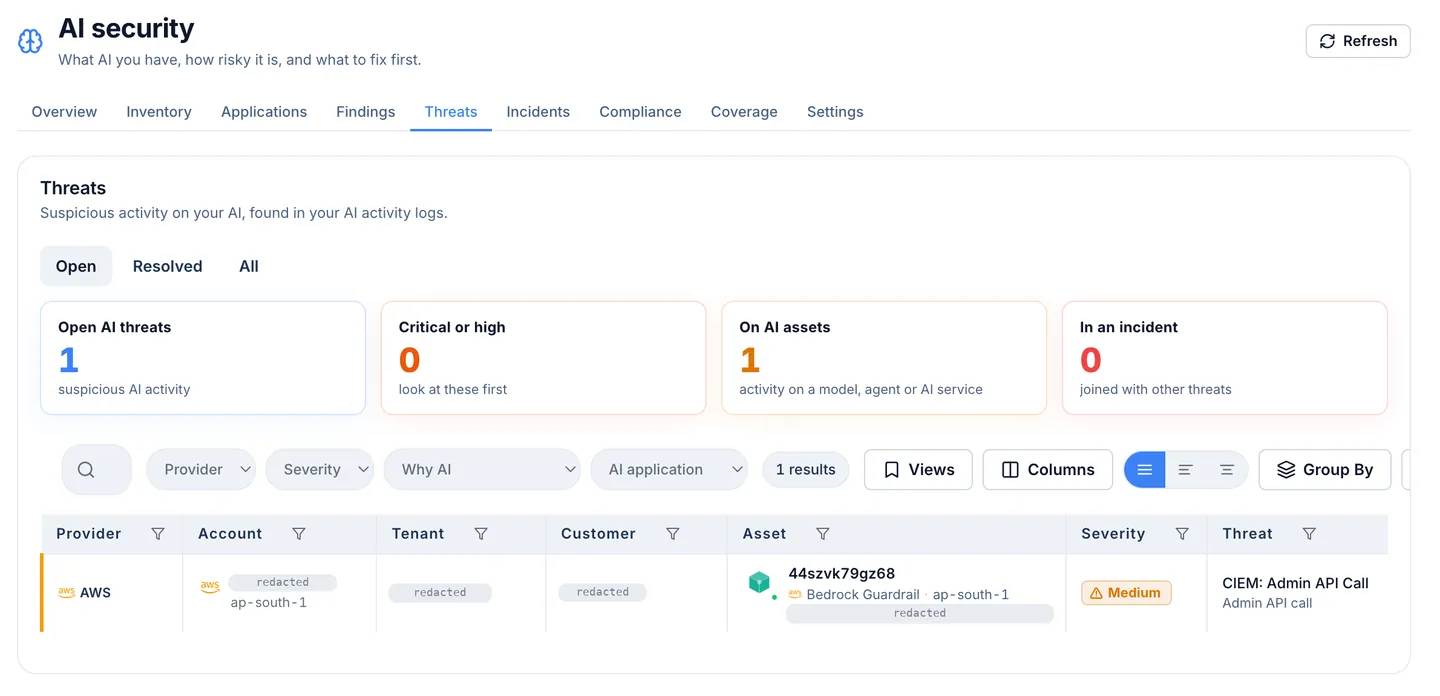
The Threats tab shows suspicious activity on AI assets, found in your AI activity logs by Onam threat detection.
What you get
What your team sees around each AI
AI agents as identities
AI execution identities marked as AI agents, with admin and wide-write findings, and identity risk on AI workloads.
Which data each AI reads
Links from each AI service to the stores it reads, with DSPM's sensitivity labels.
Guardrail attached or not
Presence on every model, deployment and agent, every scan.
Includes: Bedrock Guardrails, Azure content filters, Google Model Armor.
Suspicious activity on AI
Threats on AI assets counted on their own, with the detection that raised each one.
Questions we get a lot
Our Bedrock agent has a role with AdministratorAccess just for the demo. Will Onam flag it?
Yes. The role is marked as an AI agent and its admin access raises a finding.
Does Onam test whether our guardrail blocks prompt injection?
No. That needs prompts sent to the model, and Onam does not call your models. Onam checks that a guardrail is attached, on every model, deployment and agent, every scan. Use the provider's evaluation tools or an AI red-teaming tool to test the guardrail itself.
Does Onam read the data our AI uses?
No. A link between an AI service and a data store comes from the service's configuration. Classifying the store is DSPM's job, on the stores you choose.
Are AI services shown on attack paths?
Not yet. AI is not drawn onto attack paths today. The identity and data links on this page are direct links, not multi-hop paths.
See AI Agents, Data and Guardrails on your own cloud
Book a 30-minute demo. We walk through it on sample data, or on one of your accounts if you want to connect it.