Which AI apps have found their way into our SaaS?
The AI apps in your connected SaaS, in the same inventory as your cloud AI.
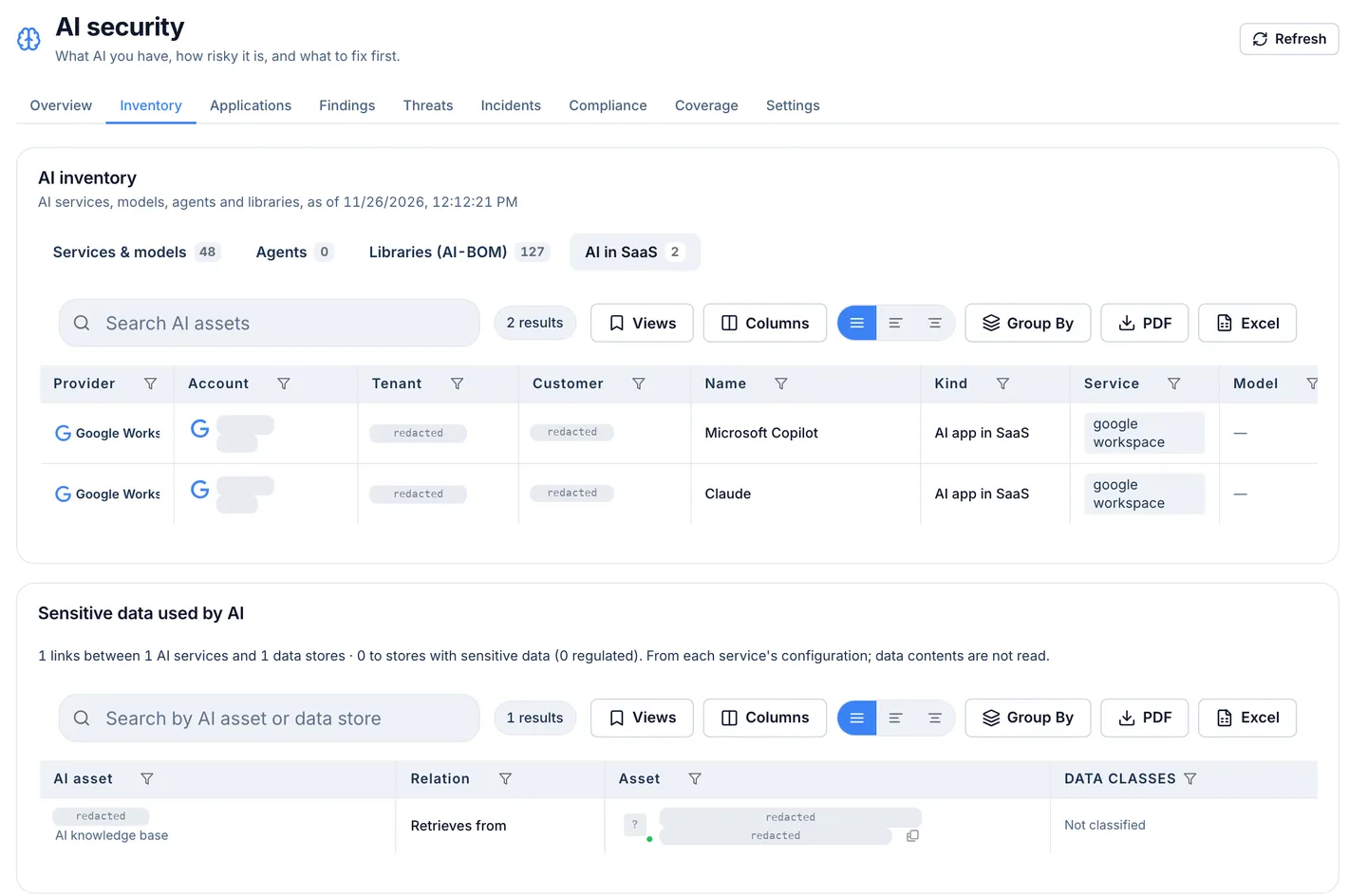
AI in SaaS lists the AI apps Onam finds in the SaaS platforms you have connected, such as Microsoft Copilot or Claude in Google Workspace. They sit next to your managed and self-hosted AI in one AI inventory, under Inventory › AI in SaaS.
- AI apps in the platforms you connected
- SaaS
- AI inventory with your cloud and cluster AI
- 1
- prompt-text detection, unless an admin turns it on
- Off
- agents or browser extensions
- 0
AI rarely arrives through a purchase order.
Someone connects an AI assistant to the company workspace to summarise documents, and colleagues follow. The security team hears about it later, if at all, and only for the one platform it happened to look at.
The whole picture
From your connected SaaS to the AI inside it
Onam lists the AI apps it finds in the SaaS platforms you connected and puts them in the same AI inventory as the rest of your AI.
- Google WorkspaceConnected read-only
- Other connected SaaSRead-only connectors
- Cloud AIAlready in the inventory
- Self-hosted AIAlready in the inventory
Lists AI apps found in your SaaS
- 1Read connected SaaS
- 2Find the AI apps
- 3Add to AI inventory
- 4Keep settings in SSPM
No agent or browser extension
AI apps nobody listed
- AI apps in SaaSFound in connected platforms
- One AI inventoryWith cloud and cluster AI
- AI in SaaS viewAI Security › Inventory
- No prompts readUnless an admin opts in
- Settings stay in SSPMAdmin roles, sharing
- ExportsPDF, Excel or CSV
AI in SaaS lists the apps; prompt-text detection is off by default, and Onam never reads training data or model weights.
How AI in SaaS works
From connected SaaS to the AI inventory
Your SaaS platforms connect through the same read-only connectors SaaS security uses, with no agent or browser extension.
Onam lists the AI apps it finds in those platforms, such as Microsoft Copilot or Claude in Google Workspace.
Inventory › AI in SaaS
The apps sit in the same AI inventory as managed AI services, self-hosted AI and the AI bill of materials.
Admin roles and sharing stay in SaaS security. The AI apps found there belong to AI security posture.
What you get
What AI in SaaS shows your team
AI apps nobody listed
The AI apps found in the SaaS platforms you connected, such as Microsoft Copilot or Claude in Google Workspace.
Includes: Microsoft Copilot, Claude, Google Workspace.
One inventory for all AI
SaaS AI next to your managed AI, self-hosted AI and AI bill of materials.
No prompts read by default
Prompt or answer text is read only if an admin turns on prompt-text detection, which is off by default.
Exports like the rest
The inventory exports to PDF and Excel or CSV, like the rest of the console.
Questions we get a lot
Which SaaS platforms does it look in?
The SaaS platforms you have connected to Onam for SaaS security, through their read-only connectors. The examples in today's console are Microsoft Copilot and Claude found in Google Workspace.
Does Onam read what people type into those AI apps?
No. AI in SaaS lists the apps. AI Security reads prompt or answer text only if an admin turns on prompt-text detection, which is off by default, and Onam never reads training data or model weights.
Is this SaaS security or AI security?
AI security (AI-SPM). SaaS security checks the platform's own settings, such as admin roles and sharing. The AI apps found in those platforms are listed in the AI inventory, next to the rest of your AI.
See AI in SaaS on your own cloud
Book a 30-minute demo. We walk through it on sample data, or on one of your accounts if you want to connect it.