What AI is running in our clouds, and which AI software do we ship?
One AI inventory and an AI bill of materials, from the accounts and code you already connected.
Managed AI services on AWS, Azure and Google Cloud come from read-only cloud roles. The AI bill of materials lists the AI libraries, model servers and MCP SDKs in the SBOMs Onam builds for your code and images. A Coverage tab shows, per AI product, what Onam can and cannot see.
- clouds for managed AI: AWS, Azure, Google Cloud
- 3
- AI products in the coverage catalogue 1.0
- 175
- from the SBOMs Onam already builds
- AI-BOM
- agents installed: read-only
- 0
Ask three teams which AI services they use and you get three different lists.
A notebook started for a test, a Bedrock model wired into one service, an AI SDK added to an image last sprint: none of it reached the security team's list, because nobody had to ask before starting it.
The whole picture
From your accounts and code to one AI inventory
Onam reads the managed AI in your clouds, filters your SBOMs for AI software, and puts it with your cluster and SaaS AI in one inventory.

 Microsoft Azure

 Kubernetes
- Connected SaaSAI apps
- Your SBOMsFor the AI BOM
Finds the AI and lists it once
- 1Read managed AI
- 2Filter SBOMs for AI
- 3Group into applications
- 4Show coverage per product
Read-only roles and the SBOMs you have
Every kind of AI, one list
- Managed AI servicesWith their settings
- AI bill of materialsLibraries, servers, MCP SDKs
- Self-hosted AIOn connected clusters
- AI in SaaSApps in connected SaaS
- AI applicationsFrom the onam-ai-app tag
- Coverage tabWhat Onam can see
Oracle Cloud, Alibaba Cloud and IBM Cloud AI are not covered. OpenAI API use shows up only as a library in the AI BOM.
How AI Inventory and AI Bill of Materials works
From accounts and code to one AI inventory
The same read-only cloud roles that feed CSPM record SageMaker and Bedrock, Azure OpenAI and Azure Machine Learning, and Vertex AI resources.
- AWS
- Azure
- Google Cloud
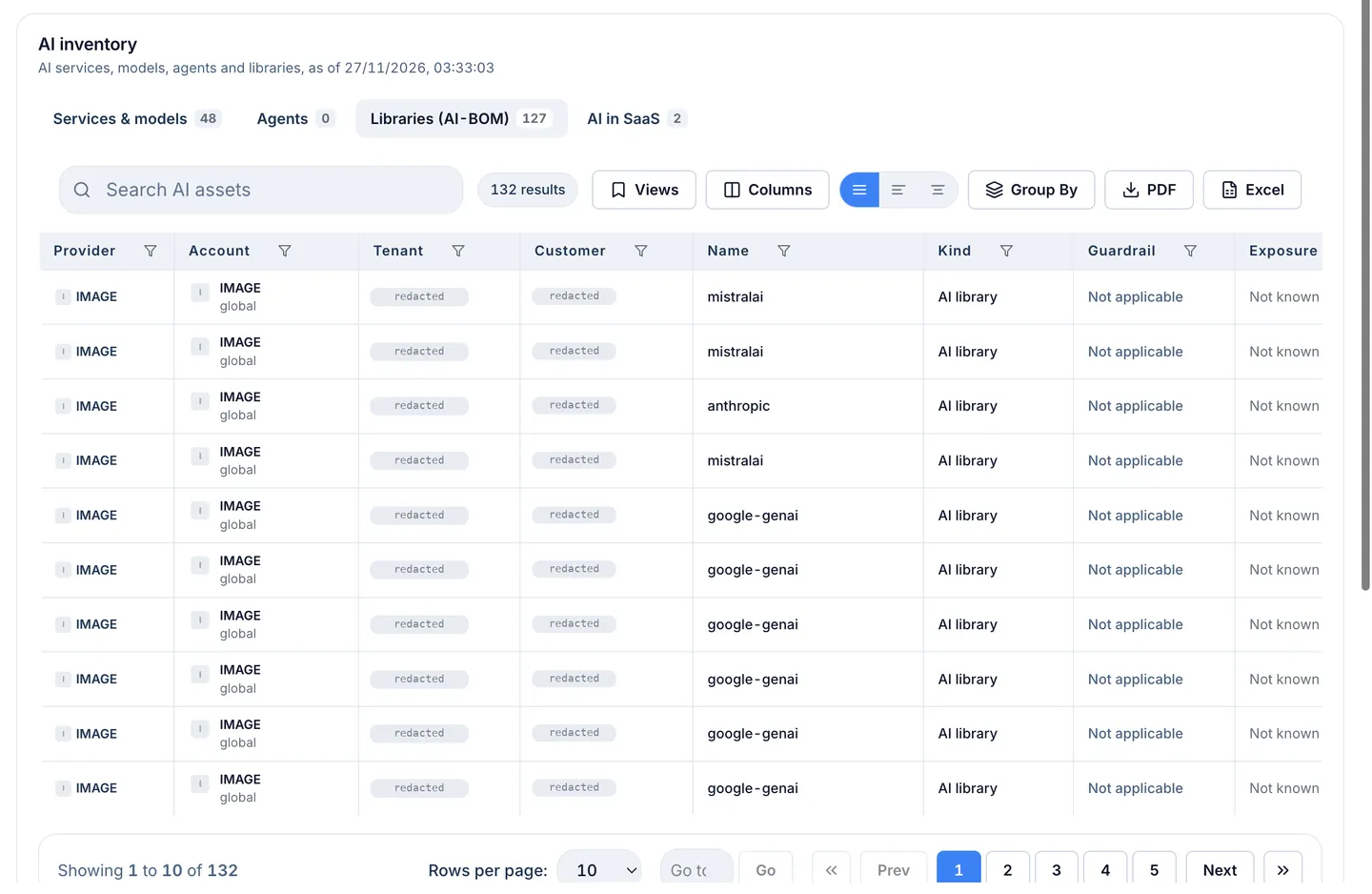
The SBOMs Onam builds for your repositories and images are filtered to AI libraries, model servers and MCP SDKs.
Inventory › Libraries (AI-BOM)
Self-hosted AI on connected Kubernetes clusters and AI apps in your connected SaaS join the same inventory.
The onam-ai-app tag and the links Onam finds between AI assets and code group your AI into applications. Onam never adds the tag.
The Coverage tab lists each AI product with its connection state, how Onam reads it, and its checks active or waiting.
175products in catalogue 1.0
What you get
What the AI inventory gives your team
Managed AI in one list
Every SageMaker, Bedrock, Azure OpenAI, Azure Machine Learning and Vertex AI resource Onam can read, with its settings.
Includes: AWS, Azure, Google Cloud.
The AI software you ship
An AI bill of materials from your SBOMs: AI libraries, model servers and MCP SDKs, with the image they came from.
AI grouped by application
Applications built from the onam-ai-app tag and from links between AI assets and code.
Honest coverage per product
Per AI product, the connection state and which checks are active. Connected with no active checks is not coverage.
Questions we get a lot
Which managed AI services are discovered?
On AWS, Amazon SageMaker and Amazon Bedrock. On Azure, Azure AI services accounts, including Azure OpenAI, and Azure Machine Learning workspaces. On Google Cloud, Vertex AI endpoints, datasets and Workbench instances. They come through the same read-only cloud roles that feed CSPM.
Where does the AI bill of materials come from?
From the SBOMs Onam builds for your repositories and images. It is a view of those SBOMs filtered to AI libraries, model servers and MCP SDKs, so it is as complete as the code and images you have connected.
What is not discovered yet?
Vertex AI feature stores, vector search and Colab, Azure Machine Learning connections, and Bedrock knowledge-base data sources. AI services on Oracle Cloud, Alibaba Cloud and IBM Cloud are not covered. The OpenAI platform itself is not connected: use of the OpenAI API from your code shows up only as a library in the AI bill of materials.
What does the Coverage tab tell me?
For each AI product in the catalogue, whether it is connected, how Onam reads it, and which checks are active or still waiting for verification. Connected with no active checks is not coverage, and the tab says so.
See AI Inventory and AI Bill of Materials on your own cloud
Book a 30-minute demo. We walk through it on sample data, or on one of your accounts if you want to connect it.